YouTube Transcript API: Fetch Captions in One Call


You need a YouTube transcript for search, summarization, or an agent. The video is public, captions are visible in the player, and all you need is text with timestamps.
Then Google's API asks for OAuth, a specific scope, and permission to edit the video. That works for your own channel, but not for a public video you don't control.
A local library avoids that setup. It also leaves IP blocking, proxy configuration, and YouTube changes in your application.
For a server-side product, the shortest path is one request that returns caption lines or a clear found: false.
Google's caption download method requires permission to edit the video. Open-source libraries are useful for local scripts, but their maintainers document blocking on cloud IPs. A managed endpoint costs $0.0013 per call and returns timestamped caption data with one API key.
Built on AnyAPI
379 scraping and data APIs behind one key.
Every endpoint in this post is one call away. Pay per request in USD from a prepaid wallet, with automatic failover when a provider breaks. No subscription, no card to start.
Get ~150 free requests$0.10 of credit on signup.How do you fetch a YouTube transcript in one call?
POST a YouTube URL or video ID to youtube.video_transcript. This example uses YouTube's Me at the zoo video.
curl -X POST https://api.getanyapi.com/v1/run/youtube.video_transcript \
  -H "Authorization: Bearer $ANYAPI_KEY" \
  -H "Content-Type: application/json" \
  -d '{"url":"https://www.youtube.com/watch?v=jNQXAC9IVRw"}'
Here's the working call and the response shape your code receives:
{
  "output": {
    "found": true,
    "data": {
      "language": "English",
      "transcript": "[{\"text\":\"All right, so here we are, in front of the elephants\",\"startMs\":\"1200\",\"endMs\":\"3360\",\"startTimeText\":\"0:01\"},{\"text\":\"the cool thing about these guys is that they have really...\",\"startMs\":\"5318\",\"endMs\":\"7974\",\"startTimeText\":\"0:05\"}]"
    }
  },
  "provider": "AnyAPI",
  "costUsd": 0.002
}
The response above is shortened for space. transcript is a JSON-encoded array, so parse it once before using the caption lines. Each line includes its text plus start and end times in milliseconds.
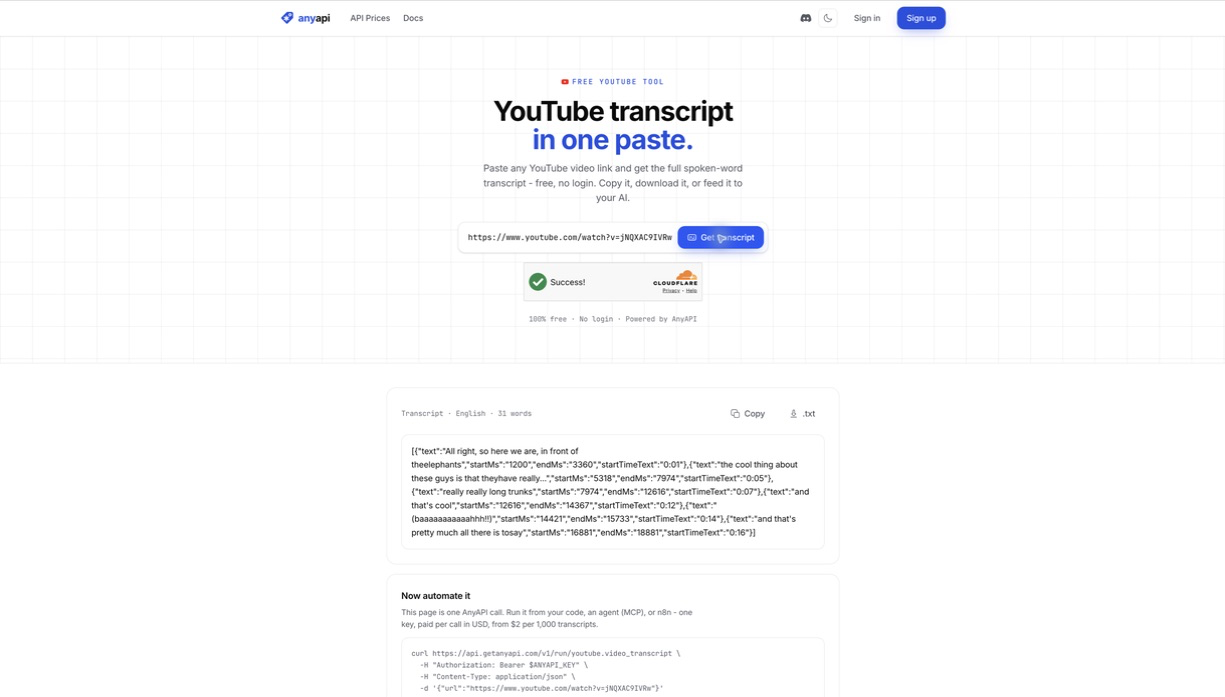
The current catalog price is $0.0013 per request; the capture above was billed at the older $0.002 shown in costUsd. The youtube.video_transcript endpoint accepts either the full URL or the video ID.
How should your application handle the response?
Check the HTTP status first, then treat found as part of the normal result. A missing key or invalid request is an API error. A successful request with no available transcript is different: output.found is false and output.data is null.
const payload = await response.json();

if (!response.ok) {
  throw new Error(`Transcript request failed: ${response.status}`);
}

if (!payload.output.found) {
  return [];
}

const lines = JSON.parse(payload.output.data.transcript);
const plainText = lines.map(({ text }) => text).join(" ");
Treat found: false as an expected branch, not as a retry signal. The video may have no accessible caption track. Retrying the same input won't create one.
The timestamps are strings in the captured response. Convert them with Number(line.startMs) before sorting, comparing, or building deep links. If freshness matters, choose a cache lifetime that allows for creators editing their captions later.
Why doesn't Google's YouTube API solve this?
Google exposes captions.list and captions.download, but those names hide an important boundary.
The official captions.list documentation says the response contains caption-track metadata, not the caption text. To retrieve the track, you call captions.download.
That download requires OAuth with youtube.force-ssl or a partner scope, plus permission to edit the video. Google documents a 403 forbidden response when the request doesn't have sufficient permission.
The official API is the right choice when you manage the video; it isn't a public transcript reader. This is an authorization constraint, so another quota allocation or API key won't remove it.
Which YouTube transcript approach should you choose?
There are three practical paths. None wins every use case.
| Approach | Best fit | Setup and cost | Main limitation |
|---|---|---|---|
| YouTube Data API | Caption workflows for videos you control | OAuth, an authorized scope, and API quota | Download requires permission to edit the video |
youtube-transcript-api | Free local scripts and experiments | Python package, no API key or headless browser | The project documents RequestBlocked and IpBlocked errors plus proxy configuration for affected environments |
| AnyAPI | A hosted app that needs one stable request contract | One API key, $0.0013 per call | Returns the available track through a managed service; no language selector in this endpoint |
The open-source option is good. It supports generated captions, translated transcripts, and custom proxy configurations. If you're running a personal script from a network YouTube accepts, start there.
Its tradeoff appears when the script becomes a service. The project's own documentation says cloud-provider IPs are most likely to be blocked and explains how to route requests through proxies. You own that network setup and the response to future YouTube changes.
Choose based on ownership and operating burden: official for your videos, OSS for scripts you can maintain, managed for production calls you don't want to babysit.
What are the endpoint's limits?
This endpoint returns captions available for the video. It doesn't promise human-reviewed transcription, and it doesn't transcribe missing audio tracks on demand. Caption accuracy therefore depends on the track that YouTube makes available.
The input schema has url and id, but no language parameter. The response reports the returned language. If you need another language, translate the text after retrieval or choose a workflow that exposes track selection.
The endpoint also has a deliberately narrow output: found, language, and the timestamped transcript. Fetch title, channel, duration, or view counts separately if your application needs them.
For several video platforms behind a similar request pattern, see the video transcript API guide. The TikTok transcript and Instagram transcript guides cover the different output shapes and platform limits.
Frequently asked questions
Can I pass a YouTube video ID instead of a URL?
Yes. Send {"id":"jNQXAC9IVRw"} instead of the url field. The input accepts either value.
Does the transcript include timestamps?
Yes. Each parsed caption line includes startMs, endMs, and startTimeText, alongside the spoken text.
Can I request a specific caption language?
Not from this endpoint. It reports the language it returned but doesn't accept a language selector. Translate the result afterward if that fits your accuracy requirements.
Can I request SRT or VTT instead of JSON?
Not directly. The endpoint returns JSON-encoded caption lines with millisecond timestamps. Convert those lines to SRT or VTT in your application if you need a subtitle file.
Does the transcript identify each speaker?
No. The response has text and timestamps, but no dedicated speaker field. Use a separate transcription or speaker-diarization step when speaker identity matters.
If you want to inspect a result before adding an API key, paste a video URL into the free tool. It uses the same transcript shape and makes the missing-caption case visible.
Paste a YouTube URL and inspect the transcript in your browser.
Try the YouTube transcript tool
Use data responsibly and follow AnyAPI's Acceptable Use Policy.