7 Apify alternatives, compared on real per-request cost


- Pick by the job, checked October 1, 2026. Structured platform data with the price shown before you call: AnyAPI. Page content for an LLM: Firecrawl. Raw HTML for your own parser: ScrapingBee or ScraperAPI. Enterprise volume with a compliance review: Bright Data. Your own servers and free software: Crawlee.
- 1,000 rendered pages cost from $0.70 to $4.90 on each vendor's cheapest paid plan. The lowest is AnyAPI's
web.scrape. ScrapingBee is next at $1.27, and ScraperAPI is the highest. - Apify is easier to price than it was. Rental Actors ended on September 30, 2026, most popular Store Actors charge a set price per result or event, and from October 2 Apify's RAG Web Browser charges $1.90 per 1,000 pages on the $19 Starter plan.
- On six common platform jobs, Apify's most-used Actors cost more than AnyAPI on the $19 Starter plan, from TikTok profiles to Google Maps searches. 29 of 30 live AnyAPI calls on those jobs returned data, with medians from 1.4 to 6.9 seconds.
- Two still can't be priced up front: Zyte's per-site tiers ($1.01 to $16.08 per 1,000 rendered pages) and Apify's general crawlers, which bill computing time.
Built on AnyAPI
411 scraping and data APIs behind one key.
Every endpoint in this post is one call away. Pay per request in USD from a prepaid wallet, with automatic failover when a provider breaks. No subscription, no card to start.
Get ~150 free requests$0.10 of credit on signup.You picked Apify so you wouldn't have to build and babysit scrapers. Now the bill reads like a menu: a plan, a different price for each Actor that also changes with your plan, and on some Actors, computing time you only see after the run.
I priced one job on Apify and 7 alternatives from each vendor's own pricing page on October 1, 2026: 1,000 JavaScript-rendered pages. That's a page that only shows its content after a browser runs the site's code, like a store page whose prices load after it opens.
It's a read of each pricing page, not a run. The only live calls here are AnyAPI's.
Why do people leave Apify?
If you've been on Apify a while, you've probably hit at least one of these: the bill depends on your plan in ways the Store badge doesn't show, the prepaid credit expires, or a community Actor stops working. Here's how the bill is built on apify.com/pricing as of October 1, 2026:
| Layer | What meters it | Published rate |
|---|---|---|
| Platform plan | Your prepaid monthly usage | $5 free, then $19, $199, or $999 a month |
| Actor price | Set by each Actor's author, per result or event, lower on bigger plans | The TikTok Scraper is $3.70 per 1,000 results on Free and $1.70 on Business |
| Compute units | 1 GB of RAM for 1 hour; you pay it on Actors billed by usage | $0.20 on Free and Starter, $0.16 on Scale, $0.13 on Business |
| Storage and transfer | Datasets, key-value stores, proxy data | Metered on usage |
The plan price is also your usage budget. Starter is $19 and comes with $19 of usage.
Apify's pricing page is explicit that unused usage doesn't roll over, so whatever you don't spend this month is gone.
The Actor price is where most of your money goes now. Apify retired rental pricing on September 30, 2026, and of the 873 most popular Actors the Store API listed on October 1, 841 charge per result or event.
On those, the Actor's author pays the computing time, so your cost is the result count times a price you can read before the run.
That price also depends on your plan. The badge on an Actor's Store page shows the Business rate, and on Free, Starter, or Scale you pay more: the TikTok Scraper's badge says $1.70 per 1,000 results, and a Free account pays $3.70.
Computing time hasn't gone away either. Apify's own general crawlers, Website Content Crawler and Web Scraper, are still billed by usage.
Their cost depends on how long the run takes and how much memory it holds, so you find out what a job cost after it runs.
Then there's upkeep. Store Actors run automated tests daily, and one that doesn't pass them at least twice in the last three days is labeled "under maintenance." When you depend on a community developer's Actor, you depend on them fixing it.
Apify does a lot well. The Apify Store lists 78,664 Actors, the biggest catalog of ready-made scrapers I know of, so for a long tail of sites there's already one that works.
And Crawlee, Apify's open-source framework, is good enough that plenty of teams build on it without ever using the platform.
Most Apify jobs now have a price you can read before the run, but the price depends on your plan and the Actor, and every Actor is a separate integration.
The 7 alternatives
They run from structured data, to page content, to raw HTML, to running it all yourself. Every price is from the vendor's own page on October 1, 2026.
AnyAPI
If you want a specific platform's data, like a Reddit search, a TikTok profile, or product listings, and you'd rather not run scrapers or keep a prepaid balance topped up, start with AnyAPI. It's a catalog of structured-data APIs (social, commerce, real estate, search) behind one key and one USD wallet.
There are 409 endpoints, each with its price per 1,000 requests shown on its catalog page before you call it. A few endpoints price per result returned, and their page says so. See how pricing works.
Every endpoint returns the same shape whichever source served the request. If one source fails, AnyAPI asks another, so your parser doesn't change.
For a page with no dedicated endpoint, web.scrape fetches any URL and returns it as Markdown or HTML, rendered in a browser, at $0.70 per 1,000 pages.
A call that fails costs nothing, except on a few endpoints where the source charges for certain failures; there you pay that charge at cost. An answer is billed at the listed price of the source that gave it, and a "not found" can be billed too.
If a second source is asked after the first, you can be billed for both, but never more in total than the top price on the endpoint's page. For a straight head-to-head, see the best Apify alternative.
Skip it if you need to run your own code, schedule crawls, or tune proxies and browsers. For a site with no endpoint, web.scrape gives you the page, and the parsing is yours.
Firecrawl
If you're feeding pages to a model, you want the readable content, not the DOM (the raw tree of tags and scripts a browser builds). Firecrawl turns any URL into LLM-ready Markdown or JSON, and JavaScript-heavy sites are handled by default.
Price: 1,000 free credits a month with no card, then Hobby at $19 a month for 5,000 credits ($16 a month billed yearly), from Firecrawl's pricing page.
A scrape is 1 credit per page with rendering included, so you pay $3.80 per 1,000 pages on Hobby billed monthly, or $3.20 billed yearly. The JSON format adds 4 credits a page.
If you're building RAG or an agent that reads whole pages, Firecrawl is the cleanest pick here. Skip it if you need specific fields: "give me this Amazon product's price and reviews" is still your parsing job, or the 4-credit JSON format.
ScraperAPI
If you have your own parser and just need the HTML to come back without getting blocked, look at ScraperAPI. It's a proxy and unblocker API: send a URL, it rotates proxies, runs a headless browser if you ask, and returns raw HTML.
Price: Hobby is $49 a month for 100,000 credits, after a 7-day trial with 5,000 (but a rendered page is 10 credits), from ScraperAPI's pricing and credit docs.
A plain page is 1 credit, but Amazon is 5, Google 25, LinkedIn 30, render=true 10, and ultra_premium 30. A rendered page on an ordinary site is 10 credits, so $4.90 per 1,000 on Hobby, and a protected domain costs several times that.
Both 200 and 404 responses are billed.
If you're pulling a high volume of raw HTML and most of your targets are plain pages that stay at 1 credit, ScraperAPI fits. Skip it if you can't predict how many pages need rendering or premium proxies, because the multipliers make the real price hard to know until you do.
You write and keep the parser either way. There's a measured head-to-head with ScrapingBee from June if you're choosing between the two.
ScrapingBee
If you want what ScraperAPI does with a shorter credit table, ScrapingBee is the same kind of product. One call, raw HTML back, proxies and browser handled.
Price: 1,000 free credits, then Hobby at $19 a month for 75,000 credits with JavaScript rendering included (but premium and stealth proxies cost more), from ScrapingBee's pricing and docs. Freelance is $49 for 250,000.
A page without JavaScript is 1 credit, with JavaScript 5, premium proxy with JavaScript 25, stealth 75. A rendered page is about $1.27 per 1,000 on Hobby and $0.98 on Freelance, the lowest rendered-page rate of the three proxy APIs here.
If you want predictable raw-HTML scraping, ScrapingBee is the pick: its flat 5-credit JavaScript rate is easier to budget than ScraperAPI's per-domain credits. Skip it if your targets are mostly protected sites, where 25 or 75 credits change the price fast, and you still parse the HTML yourself.
Zyte API
If you want someone else to fight the anti-bot problem and you're fine with a price that changes by site, Zyte API is built for that. It's a proxy and extraction API that prices each website by how hard it is to scrape.
Price: $5 of free credit, then pay as you go across five tiers per site (and Zyte picks your site's tier), from Zyte's pricing and docs.
A plain HTTP response is $0.13 to $1.27 per 1,000, and a browser-rendered one $1.01 to $16.08. Only successful responses are billed, and monthly commitments from $100 lower the rates.
Zyte assigns the tier itself, starts new sites on a temporary one, and reviews tiers every quarter with two weeks' notice. Easy sites are cheap and hard ones are 16 times dearer, and you learn which yours is when you run it, so skip it if you need the price before you start.
Bright Data
If you're buying at enterprise volume and a compliance or KYC review is part of the deal, Bright Data is built for you. It's an enterprise proxy network with scraper APIs on top, and its Web Scraper API returns structured records from sites it supports.
Price: 5,000 free records a month, then $1.50 per 1,000 records pay as you go (only for sites Bright Data supports), from Bright Data's Web Scraper page. Or $499 a month for 384,000 records and $1.30 per 1,000 after that.
It bills only for records it delivers. At real scale with a legal team involved, it's a serious option.
Skip it for a small job. The account review and sales process are a lot, and a record is only available for sites Bright Data already supports.
Crawlee
If you have servers and you'd rather write and run the scraper than pay per call, Crawlee is the one. It's Apify's own open-source framework for building scrapers in Node or Python, under the Apache-2.0 licence, with queue management, proxy rotation, browser and HTTP crawlers, and anti-blocking in one library.
Price: free (but you pay for the servers and proxies).
Skip it if you don't want to own the stack. You buy the proxies, run the servers, and fix every site that breaks: it replaces Apify's hosting and leaves the scraping to you.
What do 1,000 pages cost on each?
The job is 1,000 JavaScript-rendered pages on an ordinary site, priced on each vendor's cheapest paid plan. AnyAPI's web.scrape is the cheapest at $0.70, and ScraperAPI the dearest at $4.90. In between:
- ScrapingBee charges 5 credits a rendered page, so 5,000 of Hobby's 75,000 credits for $19: $1.27.
- Bright Data's Web Scraper API is $1.50 per 1,000 records pay as you go, if your site is one it supports. A record isn't a raw page, so it's the loosest fit here.
- Apify's RAG Web Browser charges $1.90 per 1,000 pages on Starter from October 2, 2026 ($2.28 on Free, $1.33 on Business), plus $0.000225 each time a run starts.
- Firecrawl is 1 credit a page, 1,000 of Hobby's 5,000 credits for $19: $3.80, or $3.20 billed yearly.
- ScraperAPI charges 10 credits a rendered page, so 10,000 of Hobby's 100,000 credits for $49: $4.90.
Free tiers cover part or all of this job once. Bright Data's 5,000 free records and Firecrawl's 1,000 free credits each cover it, ScraperAPI's 5,000 trial credits cover 500 rendered pages, and ScrapingBee's 1,000 free credits cover 200. Apify's $5 of free usage covers roughly 2,000 pages at the RAG Web Browser's Free rate.
Two can't be put on the chart. Zyte's browser price runs from $1.01 to $16.08 per 1,000 depending on the tier it gives your site. Apify's Website Content Crawler and Web Scraper bill computing time, which depends on how long each page takes and how much memory the run holds.
- Prices come from each vendor's pricing page and docs on October 1, 2026, at the cheapest paid plan billed monthly. Nothing was run against the six other vendors.
- "Rendered page" means one ordinary page loaded in a browser. Protected sites cost more on ScraperAPI (premium and per-domain credits), ScrapingBee (25 or 75 credits), and Zyte (higher tiers).
- AnyAPI's bar is the price of its cheapest source. If that source fails and a dearer one answers, the most a page can cost is $0.0015.
- Apify's RAG Web Browser price starts on October 2, 2026. Before that it was billed by usage.
What do common platform jobs cost on Apify?
If what you want from Apify is a profile, a product, a transcript, or a search rather than arbitrary pages, the page prices above aren't your bill. Here's each of six common jobs on its most-used Store Actor, from each Actor's published prices on October 1, 2026, next to AnyAPI's price and five live AnyAPI calls per job the same day. Apify's side shows only plans you can sign up for yourself.
| Per 1,000 | Apify's most-used Actor | Apify Free / Starter | AnyAPI | AnyAPI, 5 calls on October 1 |
|---|---|---|---|---|
| TikTok profiles | TikTok Profile Scraper | $3.00 / $2.00 | $0.40 | 5 returned data, 2.1 s median |
| Instagram profiles | Instagram Profile Scraper | $2.60 / $2.30 | $1.00 | 5 returned data, 1.4 s median |
| Amazon products | Amazon Product Scraper | $5.00 / $4.00 | $1.00 | 4 returned data, 3.6 s median |
| YouTube transcripts | Youtube Transcript Scraper | $10.00 / $10.00 | $0.90 | 5 returned data, 6.9 s median |
| Reddit searches, 25 posts each | Reddit Scraper Lite | $100.00 / $95.00 | $0.38 | 5 returned data, 2.8 s median |
| Google Maps searches, 20 places each | Google Maps Scraper | $80.00 / $60.00 | $1.75 | 5 returned data, 4.3 s median |
Apify's Starter rate is higher on all six. The gap is smallest on Instagram profiles and widest on the two searches, because the Actors charge for every post or place while one AnyAPI request returns the whole page.
The one AnyAPI miss was an Amazon product ID that came back "not found", and it cost nothing. The plan-by-plan table adds Apify's Scale and Business rates.
Which Apify alternative should you pick?
Match the pick to the job.
| If you need | Pick | Because |
|---|---|---|
| Structured platform data (social, commerce, real estate, search) | AnyAPI | The same JSON from every source, one key, the USD price shown before you call, another source if one fails |
| Page content from any URL at a flat price | AnyAPI web.scrape or Firecrawl | Markdown or HTML back; Firecrawl adds crawl and JSON extraction on one credit balance |
| Raw HTML with your own proxy and browser settings | ScrapingBee or ScraperAPI | Premium proxies, stealth modes, and geotargeting, and you parse the HTML |
| Enterprise volume with compliance and KYC | Bright Data | A large proxy network and legal coverage, built for that scale |
| No software bill and your own servers | Crawlee | Apache-2.0, you run the servers and buy the proxies |
| An AI agent that pays per call | AnyAPI | MCP-native, agents sign themselves up and pay per request with no human in the loop |
If your job is a known platform's data, use an API that already returns it in fields. If it's arbitrary pages you'll parse yourself, any of the page APIs above will do, and ScrapingBee or ScraperAPI give you the most control over how each page is fetched.
If you want to own every layer, use Crawlee.
What does an AnyAPI call look like?
Here's a call to a catalog endpoint, searching the top posts in r/homelab this month, and the response from a real run on September 27, 2026.
curl -X POST https://api.getanyapi.com/v1/run/reddit.search \
  -H "Authorization: Bearer $ANYAPI_KEY" \
  -H "Content-Type: application/json" \
-d '{"query": "subreddit:homelab", "sort": "top", "timeframe": "month"}'import os, requests
res = requests.post(
"https://api.getanyapi.com/v1/run/reddit.search",
headers={"Authorization": f"Bearer {os.environ['ANYAPI_KEY']}"},
json={"query": "subreddit:homelab", "sort": "top", "timeframe": "month"},
)
for post in res.json()["output"]["data"]["posts"]:
print(post["score"], post["title"])const res = await fetch("https://api.getanyapi.com/v1/run/reddit.search", {
method: "POST",
headers: {
Authorization: `Bearer ${process.env.ANYAPI_KEY}`,
"Content-Type": "application/json",
},
body: JSON.stringify({ query: "subreddit:homelab", sort: "top", timeframe: "month" }),
});
const { output } = await res.json();
for (const post of output.data.posts) console.log(post.score, post.title);{
"output": {
"found": true,
"data": {
"posts": [
{
"id": "1wlnt2q",
"title": "I just wanted a home server… somehow this happened",
"author": "IndependentProcess80",
"score": 7869,
"numComments": 468,
"subreddit": "homelab",
"permalink": "/r/homelab/comments/1wlnt2q/i_just_wanted_a_home_server_somehow_this_happened/",
"url": "https://www.reddit.com/r/homelab/comments/1wlnt2q/i_just_wanted_a_home_server_somehow_this_happened/",
"createdUtc": 1789926793
}
],
"nextCursor": "cur_2e53DLvWNt5pQMrd..."
}
},
"provider": "AnyAPI",
"costUsd": 0.00038
}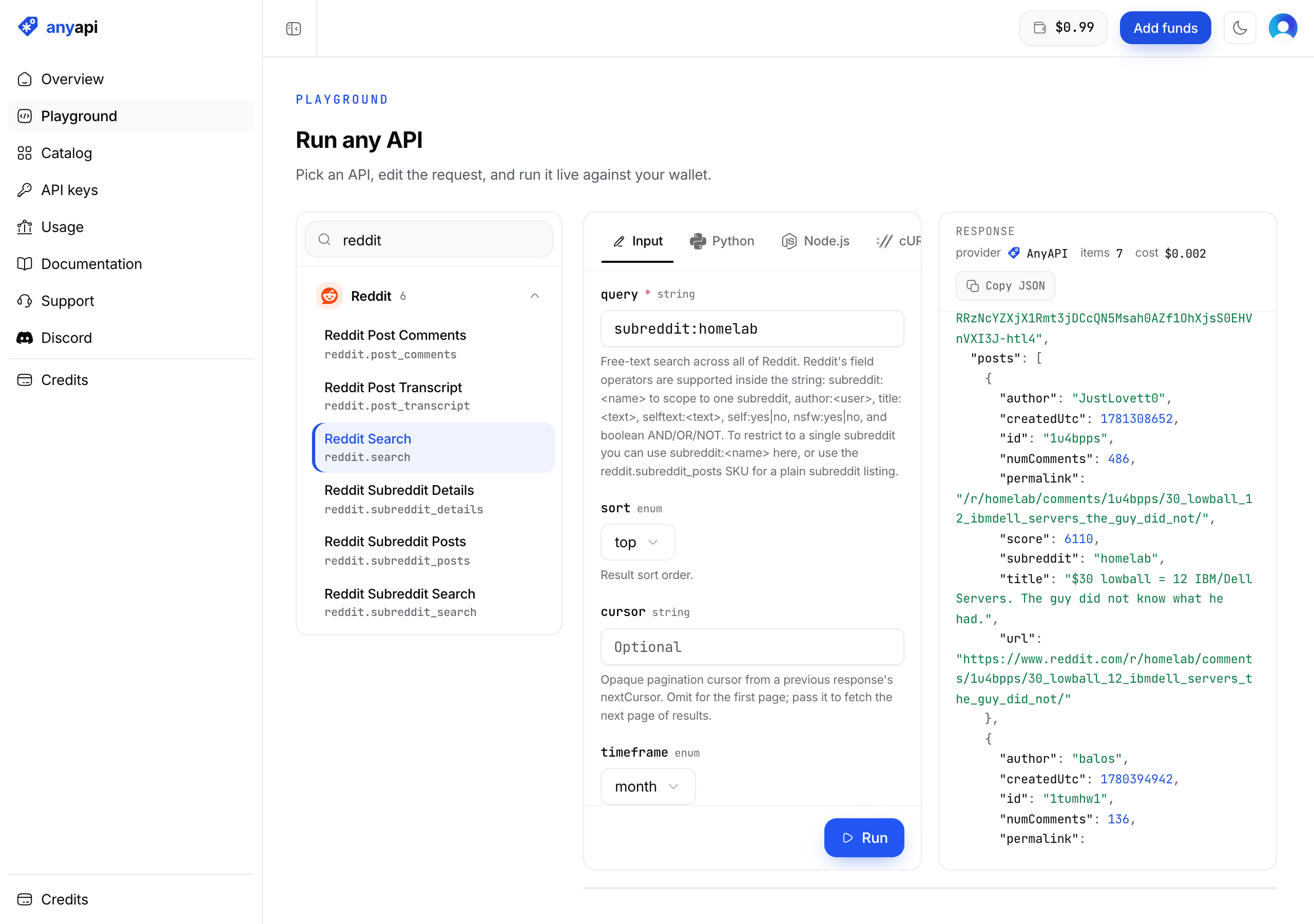
A reddit.search call costs $0.00038, which is $0.38 per 1,000 requests, and every response states its own charge in costUsd. You get the same fields back whichever source served the request, so when AnyAPI moves from a failing source to a working one, your parser doesn't change.
The same endpoint is callable over MCP, so an agent can use it as a tool with no glue code. An agent can also sign itself up and pay per call, or pay for a single call over x402 with no account at all.
When should you stay on Apify?
Switching costs you time, and sometimes staying is the right call.
- There's a maintained Actor for exactly your site and no API covers it. For a long-tail site, a working Actor beats writing your own scraper. Check its maintenance status and last update first.
- You need somewhere to run your own scraper code. Apify gives you scheduling, storage, proxies, and a runtime in one place. The alternatives that return data don't replace that; Crawlee plus your own servers does, and you take on the operations.
- You're on Business and use per-result Actors. At the Business rate the badge price is what you pay, and the bill is the result count times that price. If the plan's $999 gets used every month, the expiring credit doesn't cost you anything.
- Your usage fits in the $5 free plan. If you're inside it, the pricing model costs you nothing yet, and a migration is pure overhead.
How does Apify compare with Firecrawl and ScraperAPI?
Apify vs ScraperAPI?
They're different products. Apify runs full scraper programs (Actors) that return structured data, and ScraperAPI is an unblocker that fetches a URL and returns the raw HTML for you to parse.
If a ready-made Actor exists for your site, pick Apify. If you want proxy and browser handling for URLs you'll parse yourself, pick ScraperAPI.
Apify vs Firecrawl?
Apify runs per-site Actors that return structured records. Firecrawl turns any URL into Markdown or JSON for a model to read.
If your RAG or agent pipeline reads whole pages, go with Firecrawl. If you need one site's data in a set shape and there's an Actor for it, go with Apify.
Can I get structured data without maintaining scrapers?
Yes, that's what managed data APIs are for. AnyAPI returns structured platform fields, Firecrawl returns extracted page content, and Bright Data's Web Scraper API returns records from the sites it supports. ScraperAPI and ScrapingBee still leave the parsing to you.
Frequently asked questions
Frequently asked questions
- Is Apify free?
- Apify's Free plan includes $5 of platform usage a month with no card. That $5 pays for each Actor's per-result price on the Free rate, which is the highest of Apify's tiers, and for computing time on Actors billed by usage. Unused usage expires at the end of the month.
- How does Apify pricing work, and what is a compute unit?
- You pay a monthly plan ($0, $19, $199, or $999 on October 1, 2026), and the plan price is prepaid usage. Most Store Actors then charge their own price per result, lower on bigger plans. Actors billed by usage, such as Apify's Website Content Crawler, charge compute units instead: one compute unit is 1 GB of RAM for one hour, $0.20 on Free and Starter and down to $0.13 on Business.
- What is the cheapest Apify alternative?
- For fetching pages, AnyAPI's web.scrape at $0.70 per 1,000 pages was the lowest published price on October 1, 2026, ahead of ScrapingBee's Hobby plan at about $1.27 per 1,000 rendered pages. For $0 in software, Crawlee is free and open source, and you pay for the servers and proxies instead. New AnyAPI accounts start with a $0.10 balance and no card, and answering two welcome questions adds $0.05.
- Is there an open-source alternative to Apify?
- Yes. Crawlee (Node and Python) and Scrapy (Python) are the two open-source scraping frameworks people move to. Both are free to use, and you run them on your own servers, so you buy the proxies and fix each site that breaks.
- Which Apify alternative works with AI agents or MCP?
- AnyAPI is MCP-native, so every catalog endpoint is callable as an agent tool, and an agent can sign itself up and pay per call with no human in the loop. Apify also runs an MCP server and takes x402 payments on more than 20,000 Actors.
If you're weighing the two directly, the best Apify alternative compares Apify's per-result prices plan by plan against paying per request. For structured platform data with one key, automatic fallback, and a price you can read before the call, browse the catalog.
Every endpoint priced in plain USD, billed per request, nothing to expire. New accounts start with free credit, no card required.
Browse the catalog
Use data responsibly and follow AnyAPI's Acceptable Use Policy.