How to scrape TikTok: every endpoint, one API call each


If you want public TikTok data, TikTok's own APIs won't give it to you: the useful one is gated to academics, the rest only reach your own account. So you reverse-engineer the private web endpoints and maintain them against a target that re-signs its requests whenever it feels like it. I ran all 26 TikTok endpoints in the AnyAPI catalog against live public data. One POST each; here is what each call returns, how fast, and what it costs.
Why TikTok's own APIs don't help
TikTok has three official APIs, and none of them let you pull arbitrary public data:
- Research API is the closest fit, and it is gated hard. You apply with an academic affiliation and a research proposal, approval is limited to nonprofit universities in the US and Europe, it bars commercial use, and it caps how much you can query. If you are building a product, you will not get in.
- Display API is OAuth into a user's own account. It returns the authorized user's videos and profile and nothing else, so it is useless for looking up an arbitrary creator, hashtag, or competitor.
- Marketing API manages campaigns on your own advertiser account. It writes ad spend and reads your own performance. It does not return public content.
That leaves scraping the private web endpoints yourself, and the cost is not the first request, it is keeping it alive when TikTok changes its markup and signing. That is the work most teams underestimate.
- 26 endpoints cover profiles, videos, comments, transcripts, search, sounds, ads, and Shop. One POST each, input as JSON, normalized JSON back.
- The median call returned in 3 seconds, and 22 of the 26 came back in under 6.
- Almost every call costs $0.002 ($2 per 1,000). Two heavier ones cost more, noted below.
- No browser, no proxies, no request signing. The endpoint stays our problem when TikTok changes.
Built on AnyAPI
380 scraping and data APIs behind one key.
Every endpoint in this post is one call away. Pay per request in USD from a prepaid wallet, with automatic failover when a provider breaks. No subscription, no card to start.
Get ~150 free requests$0.10 of credit on signup.The shape of every call
The pattern is identical across all 26 endpoints. POST to /v1/run/<endpoint>, pass the input as JSON, get normalized JSON back. Here is a profile lookup:
curl -X POST https://api.getanyapi.com/v1/run/tiktok.profile \
  -H "Authorization: Bearer $ANYAPI_KEY" \
  -H "Content-Type: application/json" \
-d '{"handle": "mrbeast"}'{
"output": {
"found": true,
"data": {
"handle": "mrbeast",
"displayName": "MrBeast",
"followers": 128800000,
"following": 351,
"likes": 1300000000,
"videos": 459,
"verified": true,
"bio": "Watch my latest video! 👇"
}
},
"provider": "AnyAPI",
"costUsd": 0.002,
"items": 0
}The data sits under output.data, and every response carries the costUsd of that exact call so you can meter spend as you go. Every endpoint follows that shape. What changes is the name after the slash and the input you send.
What you can pull from TikTok
The 26 endpoints split into six groups. Profiles and the videos under them are the bulk of it, with search, sounds, ads, and a full TikTok Shop set rounding it out.
Speed was consistent. I timed every call on a single cold run, no warm-up. Most answered in a few seconds.
Profiles and audience
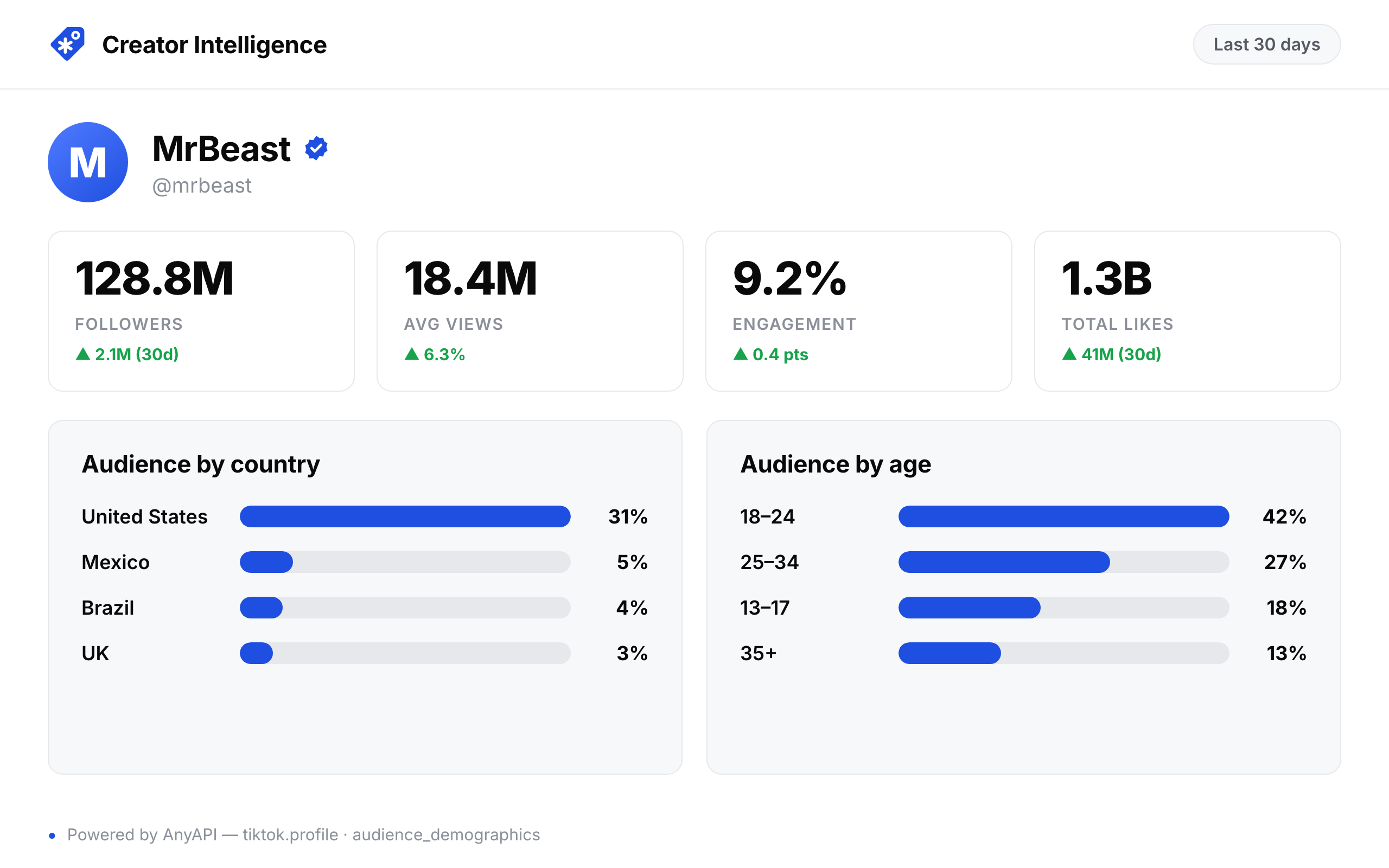
Start from a handle. You get the account's headline stats, its follower and following lists, the country it posts from, an audience-by-country breakdown, and live-room status.
| Endpoint | What you get | Key fields |
|---|---|---|
tiktok.profile | One account's stats | followers, following, likes, videos, verified, bio |
tiktok.followers | A page of followers | username, nickname, userId, followerCount, region |
tiktok.following | Who an account follows | handle, displayName, followers, region |
tiktok.profile_region | The account's country | region, profileUrl |
tiktok.audience_demographics | Follower split by country | country, countryCode, percentage |
tiktok.live | Live room status | status, title, viewers, roomId, startTime |
audience_demographics is the one you cannot get from the page itself. It samples followers and returns the country mix:
{ "audienceLocations": [
  { "country": "United States", "countryCode": "US", "percentage": "22.44%" },
  { "country": "Mexico",        "countryCode": "MX", "percentage": "8.67%"  },
  { "country": "Colombia",      "countryCode": "CO", "percentage": "5.56%"  }
] }
That split is what a creator-vetting tool runs on: filter a roster to accounts whose audience is actually in your market, and rank by real reach instead of raw follower count. It is also the field you cannot fake from a profile page, which is why it is worth the extra call.
Two caveats. following only returns data when the account leaves its follow list public, and a lot of large accounts hide it, so expect found: false on those. audience_demographics is the priciest call in the set at $0.052, because it samples followers to build the split.
Put those three calls behind a table and you have a creator-vetting dashboard: headline stats, audience geography, and recent performance in one view.
Videos and comments
From a handle you get recent uploads with their stats; from a single video URL you get its metrics, its spoken transcript, its comments, and the replies under any comment.
| Endpoint | What you get | Key fields |
|---|---|---|
tiktok.profile_videos | Recent uploads with stats | url, caption, views, likes, comments, createdAt |
tiktok.video | One video's metrics | views, likes, comments, shares, saves, region |
tiktok.video_transcript | Spoken transcript (WebVTT) | transcript, language |
tiktok.video_comments | Top-level comments | text, likes, replies, author, createdAt |
tiktok.comment_replies | Replies under a comment | text, likes, author, createdAt |
profile_videos is the workhorse. Each item is a real video with engagement attached:
{
  "url": "https://www.tiktok.com/@mrbeast/video/7651447222449556767",
  "caption": "At least he got the last one 😅",
  "views": 7003422,
  "likes": 402006,
  "comments": 13149,
  "createdAt": "1781491401"
}
The transcript endpoint returns timestamped WebVTT, the spoken audio rather than the on-screen caption, which is the version you want for search or summarization. The dedicated transcript walkthrough covers this one call in depth:
{
  "language": "",
  "transcript": "WEBVTT\n\n00:00:00.000 --> 00:00:02.700\nGuess the Youtuber win $1,000..."
}
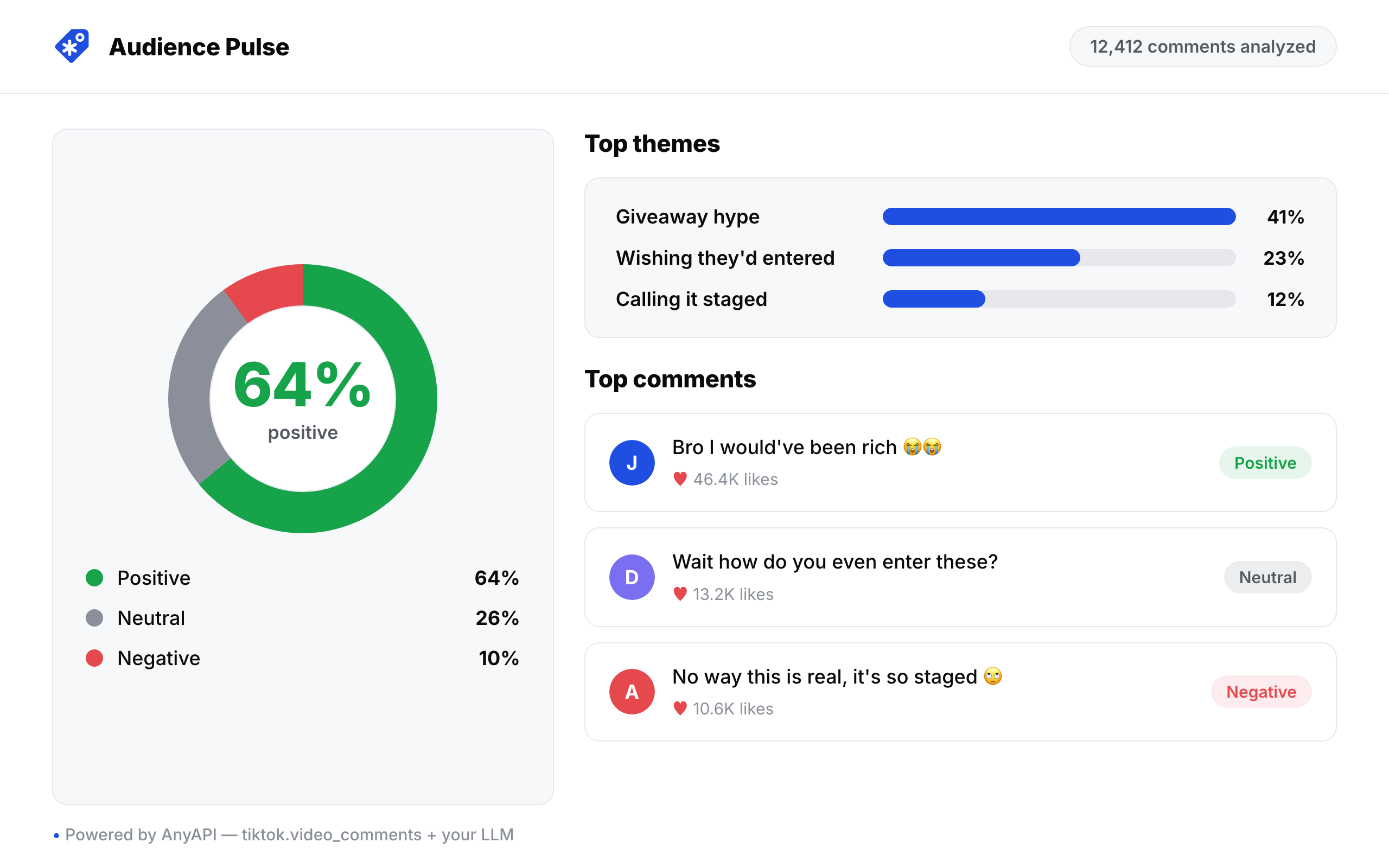
The value is in chaining them. profile_videos into video_transcript builds a searchable index of a creator's entire catalog, which is the raw material for a RAG bot, a trend tracker, or a brand-safety scan before a partnership. video_comments is where audience sentiment and unfiltered product feedback live, ready to summarize.
Run those comments through an LLM and the last point becomes an audience-feedback dashboard: sentiment, recurring themes, and the questions people keep asking, refreshed after every post.
Search and discovery
You do not need a handle to start. Search by keyword, by hashtag, or for accounts, pull a hashtag's video feed, or read a region's trending feed.
| Endpoint | What you get | Key fields |
|---|---|---|
tiktok.search_keyword | Videos for a query | caption, views, likes, comments, region |
tiktok.search_top | Top results, mixed types | author, caption, views, likes, url, contentType |
tiktok.search_users | Accounts for a query | handle, nickname, followers, userId |
tiktok.search_hashtag | Videos under a hashtag | author, caption, views, likes, createdAt |
tiktok.hashtag_videos | Full hashtag feed, rich shape | playCount, diggCount, musicMeta, authorMeta, webVideoUrl |
tiktok.trending_feed | A region's trending feed | author, caption, views, likes, url, region |
hashtag_videos returns a richer raw object per video: play counts, music metadata, author metadata, mentions, and effects. It is also the slowest call in the catalog, around 35 seconds on a cold run, because it crawls the feed in depth. The other five discovery endpoints return the same trimmed, normalized video shape as everything else and come back in a few seconds. Pick search_keyword when you want clean and fast, hashtag_videos when you want everything.
Together these cover social monitoring. Track a competitor's or your own brand's mentions over time, watch a niche for creators on the rise, or poll trending_feed into a daily digest of what is breaking out in a region. They are also the front of a creator-discovery pipeline: search_users to find accounts, then profile and audience_demographics to qualify them. The same two endpoints powered our study of the best time to post on TikTok across 5,311 videos.
Sounds
A clip ID, the kind in a TikTok music URL, gets you the sound's metadata and the videos using it.
| Endpoint | What you get | Key fields |
|---|---|---|
tiktok.song | A sound's metadata | title, author, duration, videoCount, isOriginal |
tiktok.song_videos | Videos using a sound | authorHandle, playCount, likeCount, videoId |
{ "title": "luther", "author": "Kendrick Lamar & SZA", "duration": 59, "videoCount": 1432492, "isOriginal": false }That videoCount is the adoption number: 1.4 million videos on one sound, and song_videos lists who is driving it. Poll song on a schedule and you can chart that count over time, which is the core of a trend-detection feature that surfaces a sound before it peaks.
Ads
TikTok publishes its ads in two different places, and the split matters more than it looks. The transparency library records which ads ran and when. Creative Center ranks which ads performed. Different endpoints, different fields.
| Endpoint | What you get | Key fields |
|---|---|---|
tiktok.ad_library_search | Ads matching a keyword or advertiser | adId, adTitle, brandName, estimatedAudience, firstShownUtc, lastShownUtc |
tiktok.top_ads_search | Top-performing ads for a keyword | adId, adTitle, brandName, ctr, cost, likes, industry, objective |
tiktok.ad_library_ad | One ad's detail | adTitle, brandName, landingPage, ctr, likes, videoUrl |
The first wraps TikTok's public Commercial Content Library, the ad transparency record, returned as JSON instead of a search UI. The second wraps Creative Center, which is where the performance numbers live.
{
  "adId": "7648438168497012743",
  "adTitle": "Don't Miss Out! Last 50 Sets at ✨$22.99",
  "objective": "campaign_objective_conversion",
  "ctr": 0.82
}
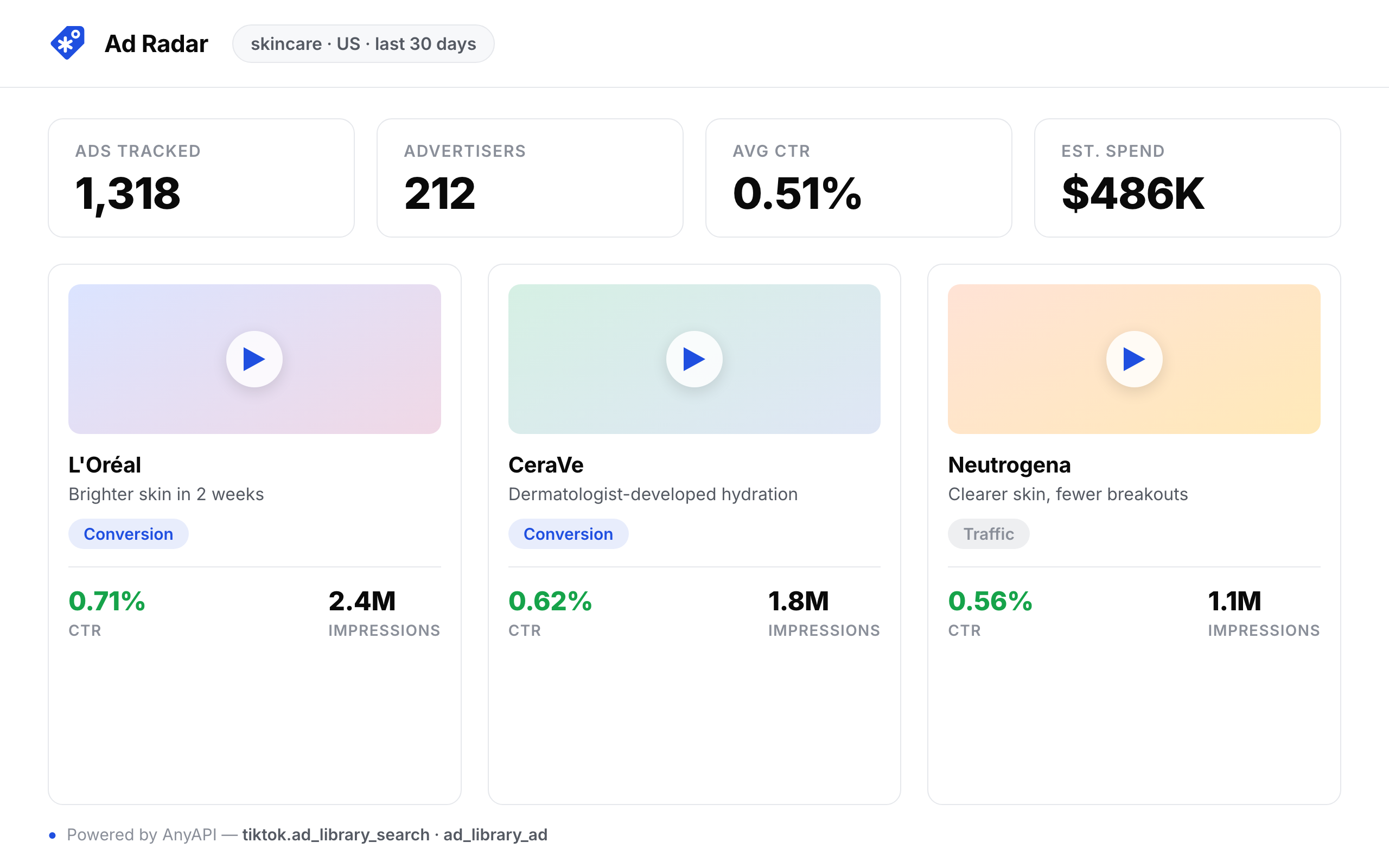
Between them you get a competitor's live creative, the dates it ran, its campaign objective, its click-through rate, and the landing page it points at.
Run ad_library_search nightly and diff the new ad IDs, and the public ad library becomes an ad-intelligence feed of what competitors shipped this week.
TikTok Shop
The set most TikTok scrapers skip. Search products, pull one product's detail, read its reviews, list a store's catalog, or read a creator's product showcase.
| Endpoint | What you get | Key fields |
|---|---|---|
tiktok_shop.search | Products for a query | title, price, rating, soldCount, shopName, url |
tiktok_shop.product | One product's detail | price, rating, reviewCount, soldCount, sellerName, sellerLocation |
tiktok_shop.product_reviews | A product's reviews | text, rating, reviewerName, verifiedPurchase, createdAt |
tiktok_shop.shop_products | A store's catalog | title, price, rating, soldCount, url |
tiktok_shop.user_showcase | A creator's showcased products | title, price, rating, imageUrl, url |
{
  "title": "Silicone Smartphone Case with Lip Gloss Holder",
  "price": "$16.14 - 16.99",
  "rating": 4.6,
  "reviewCount": 583,
  "soldCount": 4846,
  "sellerName": "Trendy Shop",
  "sellerLocation": "United States of America"
}
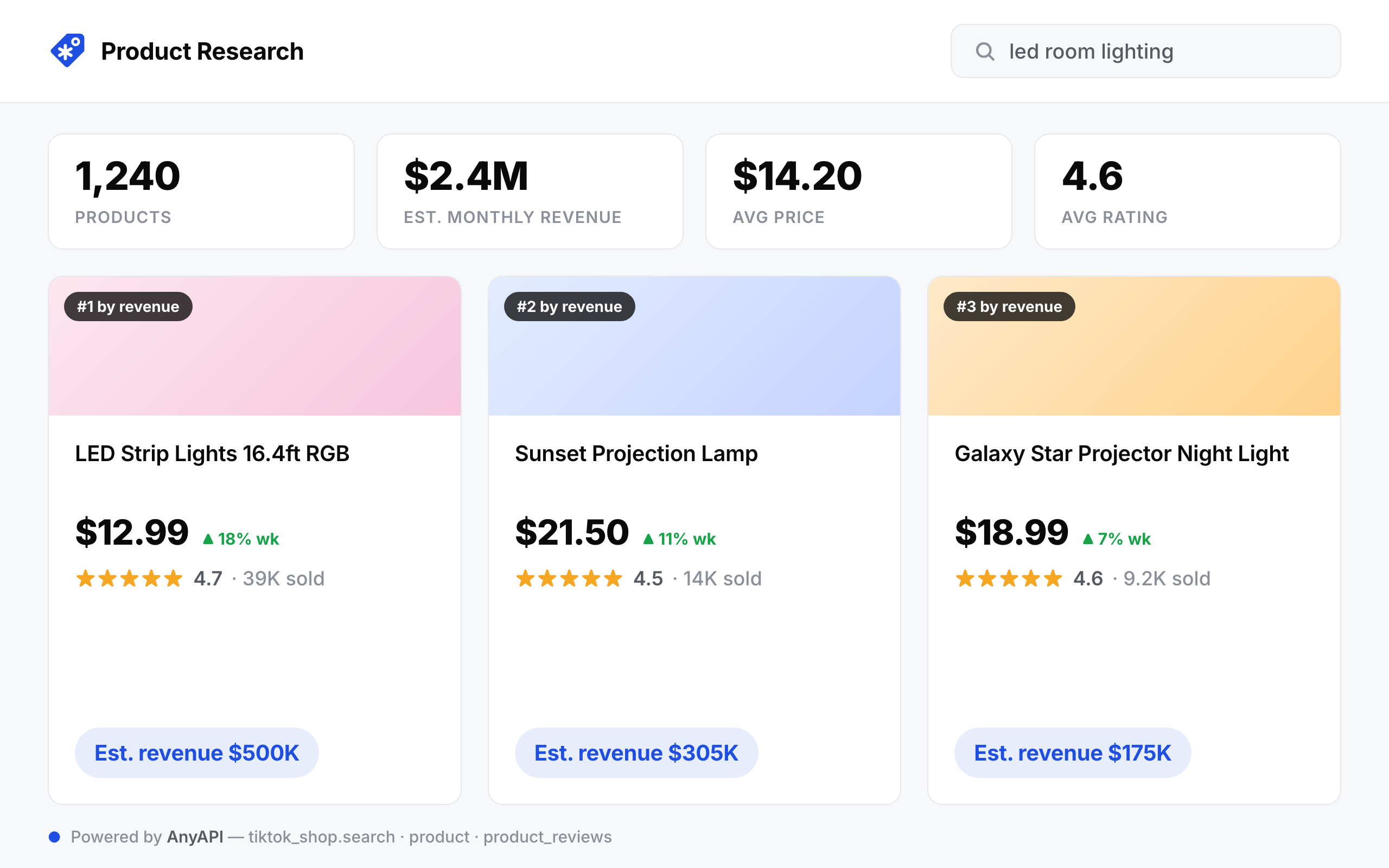
Together these cover product research and competitive pricing. search to size a category by soldCount, product and product_reviews to read demand and complaints on a single listing, shop_products to map a competitor's whole catalog, and user_showcase to see which products a creator actually pushes. With soldCount and price you can estimate a seller's revenue without leaving the call.
The Shop endpoints want a region ("US") alongside the URL. Leave it off and the product lookup returns a 502, which cost me one confused minute before I added it back.
Sort a category by that revenue estimate and you have a product-research tool, the seller's manual spreadsheet turned into a product.
Chaining calls: a worked pipeline
Most jobs chain a list call into detail calls. This one goes from a handle to a folder of transcripts, three endpoints piped with jq:
# 1. recent video URLs for a creator
curl -s -X POST https://api.getanyapi.com/v1/run/tiktok.profile_videos \
  -H "Authorization: Bearer $ANYAPI_KEY" -H "Content-Type: application/json" \
  -d '{"handle": "mrbeast"}' \
  | jq -r '.output.data.videos[].url' > urls.txt

# 2. transcript for each
while read url; do
  curl -s -X POST https://api.getanyapi.com/v1/run/tiktok.video_transcript \
    -H "Authorization: Bearer $ANYAPI_KEY" -H "Content-Type: application/json" \
    -d "{\"url\": \"$url\"}" | jq -r '.output.data.transcript'
done < urls.txt
No login tokens, no proxies, no scraping logic to keep alive. The same pattern, pull a list then fetch each item's detail, works for comments, for Shop reviews, and for sounds. The dashboards above are each one of these chains behind a UI, and the 26 endpoints recombine into plenty more: a trend tracker from song and trending_feed, a transcript search engine from video_transcript, or a niche leaderboard from search_users and profile.
Why not scrape it yourself
You can, and for a one-off you probably should. For anything that has to keep running, maintenance is the real cost.
| Approach | Setup | Breaks when | Who maintains it |
|---|---|---|---|
| Headless browser | Hours to days | Markup shifts, bot checks, signing changes | You, continuously |
| Unofficial library | Minutes | The library falls behind TikTok | The maintainer, until they stop |
| One API call | One request | Rarely, and it is our problem | Us |
The hidden cost of the first two is maintenance. When TikTok changes its signing scheme, the pipeline goes quiet until someone notices, usually a week after it broke.
Scraping public data is generally permitted, but you are responsible for using it lawfully, especially anything tied to a person. Read the acceptable use policy before you ship, and do not collect data you do not have a basis to process.
Limitations worth knowing before you build
Three things will bite you if nobody tells you first.
Most of the ad library's filters do nothing. TikTok's public Ads Library takes a keyword or an advertiser name, and that is genuinely all it filters on. I sent the same keyword with the region set to Japan, Brazil and Germany, with the date window set to 7 days and to 180, and with every industry and objective value in turn. Every one of those calls returned the identical twelve ads. Filter after you have the rows, not before.
Creative Center filters partly, and its defaults narrow hard. Campaign objective and performance percentile are real: switching objective moved one search from 30 matches to 130. Region and language are not, and return identical results whatever you pass. Watch the defaults too, because leaving objective and performance percentile at their most restrictive values cut an unfiltered search from 300 matches to 30 without saying so.
The ads endpoints are the flakiest of the set. TikTok answers the library with a bare "system busy" more often than anything else here, and it is upstream, not something a client can avoid. I saw it from two independent providers within seconds of each other, which is how you know it is TikTok and not the vendor. Retry rather than treating the first failure as an empty result.
Frequently asked questions
How do I scrape TikTok without getting blocked?
The blocking problem is proxies, rotation, and request signing, and it is the part that breaks. Using a hosted endpoint moves that maintenance off your plate: you send one request and the blocking is handled upstream. If you roll your own, expect to maintain residential proxies and the signing scheme continuously.
Can I scrape TikTok without an account or login?
Yes. None of the 26 endpoints need a TikTok login, cookies, or a session. You send one authenticated POST with your key and get public data back. The login and session juggling is what breaks home-grown scrapers, and it is handled upstream here.
What is the difference between the TikTok ad library and Creative Center?
They are two separate datasets and you usually want both. The Ads Library is the transparency record: which ads ran, between which dates, and roughly how many people saw them. Creative Center ranks performance: click-through rate, spend band, likes, industry, and campaign objective. An ad can appear in one and not the other.
Is there a free way to get a TikTok transcript?
Yes, for a one-off. Our free TikTok transcript tool does it in the browser with no key. For bulk or programmatic use, the tiktok.video_transcript endpoint above is one call at $0.002.
How much does it cost to scrape TikTok this way?
Almost every endpoint is $0.002 per call ($2 per 1,000). The audience-demographics call is $0.052 and the deep hashtag feed is $0.03, because both crawl more. There is no subscription; you pay per request in dollars.
All 26 TikTok endpoints plus 200+ other sources, one key, priced in dollars. New accounts start with free credit to run the calls in this post.
Browse the TikTok endpoints in the catalog