Amazon API for web scraping: search, products, reviews


One request cost $0.0009. It returned an Amazon Standard Identification Number (ASIN), title, price, rating, review count, sponsored flag, and search position as typed JSON.
The input was an Amazon search URL. Amazon's official catalog API serves a different job: accepted Associates building shopping experiences. A managed public-data endpoint fits applications and agents that start with a search, URL, or ASIN and may also need customer review text.
Amazon Product Advertising API is deprecated. Its supported successor, Creators API, requires an accepted Associates account and qualifying sales. For public search, product, and review retrieval without that affiliate dependency, use structured endpoints and treat every listing field as point-in-time data.
Built on AnyAPI
401 scraping and data APIs behind one key.
Every endpoint in this post is one call away. Pay per request in USD from a prepaid wallet, with automatic failover when a provider breaks. No subscription, no card to start.
Get ~150 free requests$0.10 of credit on signup.Choose the access path before you write code
Pick from the data your application needs and the account relationship it already has.
| Path | Use it when | What you get | Main constraint |
|---|---|---|---|
| Amazon Creators API | You run an accepted Associates property and build product discovery or referral features | Catalog search, item details, variations, and browse nodes | Access depends on Associates approval and qualifying sales |
| Managed structured Amazon API | Your input is a public search URL, product URL, or ASIN | Search records, product details, batch ASIN lookup, and review text | You pay per request or result, and public fields can change |
| General scraping API | You need arbitrary Amazon pages, raw HTML, or a custom extraction schema | HTML, rendered pages, or fields you define | You still own the downstream schema and may own parsing logic |
For new work, treat Product Advertising API as retired; Amazon's supported official path is Creators API. If you have an existing Product Advertising API (PA-API) integration, migrate it. If you don't have an Associates business, don't build a delivery plan around credentials you can't obtain.
For arbitrary pages or raw HTML, a general scraper remains the right category. The ScrapingBee and ScraperAPI comparison covers that job. The rest of this guide stays with structured Amazon search, product, ASIN, and review records.
Check what Amazon's official API covers now
Amazon's PA-API 5 deprecation notice marks the old API as deprecated and directs integrations to Creators API. A current implementation should start from the successor rather than an old PA-API tutorial.
Creators API fits affiliate catalog experiences, and access depends on accepted Associates status plus qualifying sales. Amazon's Creators API introduction states that access requires at least 10 qualifying sales in the past 30 days. The registration guide also requires final acceptance into Associates.
The documented operations are:
SearchItemsfor keyword, category, and filtered product discoveryGetItemsfor product details by ASIN or another supported identifierGetVariationsfor related size, color, and other variationsGetBrowseNodesfor category hierarchy
Amazon's SearchItems reference returns up to 10 items per request and lets you request resources such as images, item information, offers, and search refinements. The operation list doesn't include customer review text.
Rates also follow the affiliate model. Amazon's API rates documentation gives new credentials up to 1 transaction per second and 8,640 transactions per day for the first 30 days. It then adjusts limits using shipped revenue and can remove access after 30 days without qualified referring sales.
If you need public review text or don't qualify for Associates access, use a managed structured-data API. That keeps the application contract tied to the public input and returned fields instead of affiliate performance.
Run one structured Amazon search request
This request searches Amazon for mechanical keyboards and asks for one result. The same body works from cURL, Python, or JavaScript.
curl -sS -X POST https://api.getanyapi.com/v1/run/amazon.search \
  -H "Authorization: Bearer $ANYAPI_KEY" \
  -H "Content-Type: application/json" \
-d '{"url":"https://www.amazon.com/s?k=mechanical+keyboard","limit":1}'import os
import requests
response = requests.post(
"https://api.getanyapi.com/v1/run/amazon.search",
headers={"Authorization": f"Bearer {os.environ['ANYAPI_KEY']}"},
json={
"url": "https://www.amazon.com/s?k=mechanical+keyboard",
"limit": 1,
},
)
response.raise_for_status()
print(response.json())const response = await fetch(
"https://api.getanyapi.com/v1/run/amazon.search",
{
method: "POST",
headers: {
Authorization: `Bearer ${process.env.ANYAPI_KEY}`,
"Content-Type": "application/json",
},
body: JSON.stringify({
url: "https://www.amazon.com/s?k=mechanical+keyboard",
limit: 1,
}),
},
);
if (!response.ok) throw new Error(`HTTP ${response.status}`);
console.log(await response.json());The response:
{
  "costUsd": 0.0009,
  "output": {
    "found": true,
    "data": {
      "items": [
        {
          "asin": "B0CF3VGQFL",
          "title": "Redragon Mechanical Gaming Keyboard Wired, 11 Programmable Backlit Modes, Hot-Swappable Red Switch, Anti-Ghosting, Double-Shot PBT Keycaps, Light Up Keyboard for PC Mac",
          "price": 29.99,
          "currency": "USD",
          "listPrice": 0,
          "rating": 4.3,
          "reviewsCount": 6726,
          "offersCount": 0,
          "isSponsored": true,
          "position": 1
        }
      ]
    }
  }
}
The ASIN is the stable handoff between steps in your pipeline. Price, rating, sponsored status, and position describe what the public listing returned at request time. The top result here is sponsored, so filter on isSponsored before treating position as organic rank.
Start with amazon.search, then carry the returned ASIN into amazon.product, amazon.asins, or amazon.reviews. That gives your code one explicit transition from discovery to detail instead of another page parser.
Carry the ASIN into product and review calls
| Endpoint | Input | Use it for | Observed billed cost |
|---|---|---|---|
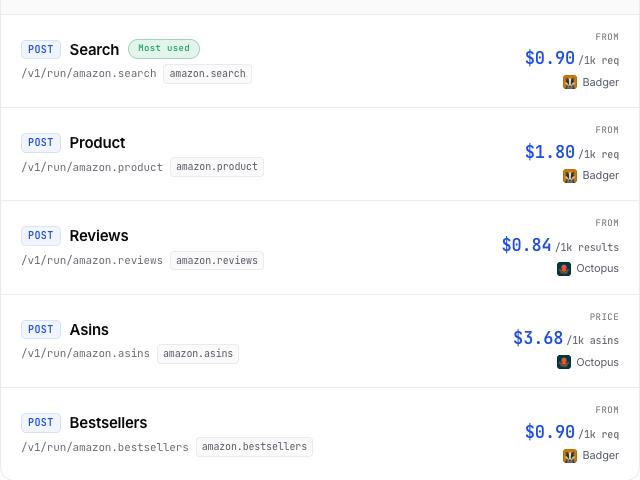
amazon.search | Search or category URL | Ranked discovery of 1-20 results with ASIN, price, rating, and position | $0.0009 at limits 1 and 3 |
amazon.product | Product URL | One product's brand, offer, availability, features, and images | $0.0018 for 1 product request |
amazon.asins | Up to 10 ASINs | Batch product lookup | $0.00368 for 1 returned ASIN |
amazon.reviews | ASIN or product URL | Up to 50 reviews with text, rating, date, helpful votes, and verified-purchase status | $0.0018 total for a 3-review call |
amazon.search billed $0.0009 in both verified calls, at limits 1 and 3. amazon.asins bills per ASIN returned. Review pricing has both per-result and flat request options: the live page lists prices from $0.84 per 1,000 results, while the three-review call used the cheaper flat option and billed $0.0018 total. Don't use that observed total as a per-review rate for a larger batch.
Use amazon.product when your application already has a product URL:
curl -sS -X POST https://api.getanyapi.com/v1/run/amazon.product \
  -H "Authorization: Bearer $ANYAPI_KEY" \
  -H "Content-Type: application/json" \
  -d '{"url":"https://www.amazon.com/dp/B0CF3VGQFL"}' \
  | jq '.output.data.items[0] | {
      asin, brand, price, currency, inStock, rating, reviewsCount
    }'
The projection:
{
  "asin": "B0CF3VGQFL",
  "brand": "Redragon",
  "price": 29.99,
  "currency": "USD",
  "inStock": true,
  "rating": 4.3,
  "reviewsCount": 6726
}
Use amazon.asins when search has produced a batch:
curl -sS -X POST https://api.getanyapi.com/v1/run/amazon.asins \
  -H "Authorization: Bearer $ANYAPI_KEY" \
  -H "Content-Type: application/json" \
  -d '{"asins":["B0CF3VGQFL"],"amazonDomain":"amazon.com","limit":1}'
That call returned one in-stock product at $29.99 with a 4.3 rating, 6,726 reviews, condition New, and seller Redragon Official. Batch size is capped at 10 ASINs, so split a larger queue into chunks and retain the ASIN as your join key.
Use amazon.reviews when the review body is part of the job:
curl -sS -X POST https://api.getanyapi.com/v1/run/amazon.reviews \
  -H "Authorization: Bearer $ANYAPI_KEY" \
  -H "Content-Type: application/json" \
  -d '{
    "product":"B0CF3VGQFL",
    "limit":3,
    "sort":"recent",
    "region":"amazon.com"
  }'
Three review records came back. Each included rating, title, text, verifiedPurchase, helpfulVotes, reviewer, and createdUtc; all three had verifiedPurchase: true.
Handle changing fields and failure modes
Normalization removes page-specific extraction logic. Retail fields such as price and availability still change over time.
Keep price, availability, rating, review count, sponsored status, and search position timestamped because public listings change. Store the ASIN and the observation time with each record. Re-fetch the fields whose freshness matters to your product rather than treating one response as permanent catalog truth.
Also handle these response cases directly:
found: falsemeans the requested product or result wasn't available through that call.- Numeric
0can mean the public listing didn't report a value, depending on the field. - Product URLs and ASINs are better join keys than titles, which sellers can edit.
- Marketplace input matters. Keep
amazon.com,amazon.co.uk, and other domains explicit in stored jobs. - Review filters narrow the delivered set. Record
sort, region, rating filters, keywords, and dates beside the output.
If you need a custom field from an arbitrary page, return to the general-scraper path. If the job stays inside search, product detail, ASIN batches, and review records, fixed schemas make downstream validation much simpler.
Before shipping, recheck each endpoint's required input, result limit, output fields, billing unit, and current USD price. Those are the parts of the live contract that affect your validator and budget.
Inspect current inputs, normalized output fields, and USD pricing before implementation.
Inspect the Amazon endpoints
Use data responsibly and follow AnyAPI's Acceptable Use Policy.