Shopify API: how to get any store's products, prices and stock


- Try the free feed before you pay to watch a few stores. Shopify's free store feeds and AnyAPI returned the same first page of products, in the same order, at every store that answered.
- You don't need the merchant's login to check a price. The Shopify Storefront API lets you ask for prices and see which sizes you can buy. You can do both without a token.
- Decide whether you need a stock count. A yes or no is enough for a back-in-stock alert. If you need to know how many are left, try the Apify Shopify Scraper on a store that publishes quantities.
Built on AnyAPI
500 scraping and data APIs behind one key.
Every endpoint in this post is one call away. Pay per request in USD from a prepaid wallet, with automatic failover when a provider breaks. No subscription, no card to start.
Get ~160 free requests$0.10 of credit on signup.A rival has marked down the shorts you sell at full price. Before you match the discount, you might want to know which sizes a shopper can still buy. A sale price on a sold-out pair tells you something different.
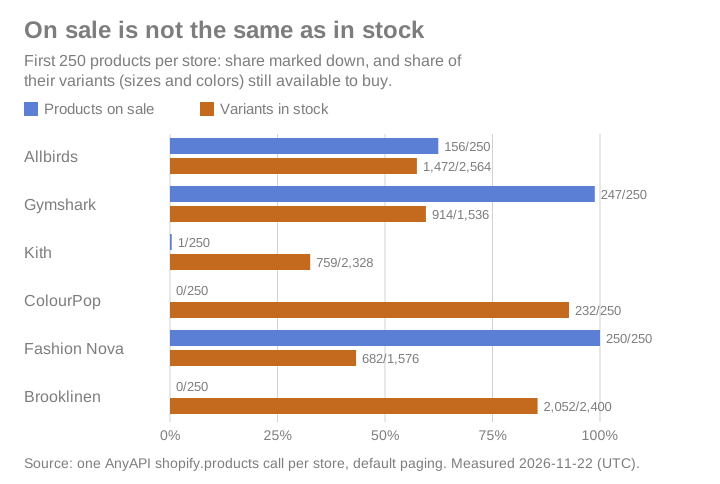
I used 31 AnyAPI calls to pull the first 250 products from each of six Shopify stores and compared the results with each store's free feed. I paged through Gymshark's free feed and queried three stores through the Storefront API without a token; for Apify, the Bright Data Shopify Scraper API, Store Leads and ShopXray, I read the pages but didn't run the tools.
Start with the domains you want to watch. If you don't know those yet, you'll want a store directory before you need a product feed.
The best Shopify data APIs
- Shopify's free store feeds for developers watching a few stores
- Shopify Storefront API for developers who want documented GraphQL
- AnyAPI for watching many stores from code or an AI agent
- Apify Shopify Scraper for exact stock counts where stores publish them
- Bright Data Shopify Scraper API for teams already collecting pages in bulk
- Store Leads for finding stores to watch
- ShopXray for tracking rivals without code
What makes a good Shopify data API?
If you're watching someone else's store, check what you can actually learn from a product page before you build a report around it.
- Access. Can you read the catalog with just the store's domain, or does the merchant have to install an app?
- Sale price. Keep the current price alongside the higher price the store crossed out. Otherwise you can't tell which items the store's advertising as marked down.
- Stock by size or color. Shopify calls each choice a variant. A product can still be available after the size you care about sells out.
- Cost to refresh a catalog. Some scrapers charge for every product they return. Others bill for the page, even if it contains hundreds of products.
- The 31 AnyAPI calls covered eight domains. Six answered: Allbirds, Gymshark, Kith, ColourPop, Fashion Nova and Brooklinen. The comparison used the first 250 products at each, plus a separate 42-page walk through Gymshark's free feed.
- A headless store like Bombas uses its own storefront. Its usual feed address exposed no catalog: Bombas answered 429, and Ruggable's feed answered 404. Neither domain turned up in the store lookup.
- Without the store's token, the public feeds and Storefront API show stock as yes or no. Some count-reading tools infer quantities from what the shopping cart will let a shopper buy.
- Catalog paging stops at 25,000 products. Kith's free feed refused page 101. The paid list returns
hasMore: falsewhen you reach the limit, so you know to stop. - Apify, Bright Data, Store Leads and ShopXray weren't run. Their features and prices come from their own pages; stock-count claims weren't tested. Prices were checked at the time of writing, using monthly plans or pay-as-you-go rates as listed.
The best Shopify data APIs at a glance
| Tool | Best for | Why pick it | Pricing |
|---|---|---|---|
| Shopify's free store feeds | A few known domains | All 10,423 Gymshark products in 42 pages without throttling | Free |
| Shopify Storefront API | Documented GraphQL queries | Choose product and variant fields without a store token | Free; tokenless query complexity limit of 1,000 |
| AnyAPI | Many stores, store facts and filtered lists | Store lookup took 2.3 seconds; a 250-product page took 2.6 seconds (medians) | $0.85 per 1,000 requests |
| Apify Shopify Scraper | Public inventory counts | Optional quantity per product | $1.00 per 1,000 products on Free, $0.70 on Gold+; inventory adds $0.001 per product |
| Bright Data Shopify Scraper API | Bulk collection on Bright Data | Inventory status with billing by page load | 5,000 free page loads a month, then $1.50 per 1,000 pay as you go |
| Store Leads | Finding rival stores | Weekly store profiles with estimated monthly sales | Premium $75/month; API access from $250/month |
| ShopXray | A dashboard for a few rivals | Tracks stock changes to estimate sales | Starter $19/month for 3 stores; Growth $49/month for 7 |
Best Shopify data API for developers watching a few stores
Shopify's free store feeds
Shopify's free store feeds pros:
- Product prices and availability by variant without a key
- The whole Gymshark catalog in about half a second per page
Shopify's free store feeds cons:
- Shopify doesn't document the catalog feed
- Search suggestions can return 429 when you make requests too quickly
Try https://gymshark.com/products.json?limit=250&page=1. Change the domain to a shop you follow, then advance the page number. I got about 10,400 Gymshark products that way without a single request being throttled.
For one product, use /products/<handle>.js, where the handle is the last part of its product URL. For a keyword, /search/suggest.json returns up to ten suggestions per type. Shopify documents those two calls for themes it hosts; you won't find /products.json in its Ajax API docs.
For a handful of stores, the free feed is enough. Across the six first pages, the paid list matched every product ID in order, right down to the same count of in-stock variants.
Shopify's free store feeds pricing: Free.
Best Shopify data API for developers who want documented GraphQL
Shopify Storefront API
Shopify Storefront API pros:
- Shopify documents which fields you can request without a token
- Prices and availability for each variant, plus product and collection search
Shopify Storefront API cons:
- Exact quantities and product tags need a token
- Shopify limits automated traffic, especially unsigned requests
The Shopify Admin API only reads stores that installed your app. The merchant's installation gives the app an access token. That works for your own shop or a client who lets you in, but it won't open a rival's inventory.
Use the Storefront API if you'd rather name the fields you want than rely on an undocumented feed. That's what GraphQL lets you do: I asked Allbirds, Gymshark and Kith for titles, prices and availableForSale, and all three answered without a token.
Asking for quantityAvailable instead got "Access denied for quantityAvailable field". That quantity field needs a token with inventory access.
Shopify Storefront API pricing: Free. Tokenless queries have a complexity limit of 1,000, which limits how much you can ask for in one query.
Best Shopify data API for watching many stores from code or an AI agent
AnyAPI
AnyAPI pros:
- Store location, currency, catalog size, shipping destinations and social links from a domain
- Filters for recent launches, markdowns and products still in stock
AnyAPI cons:
- The unfiltered list didn't uncover any products missing from the free feed
If you're tracking launches across stores, the filters save you from downloading each catalog and sorting it yourself. At Kith, publishedWithinDays: 7 returned a full page of recent products. At Allbirds, onlyOnSale and onlyInStock found 155 matches on the first page and another 55 on the next. A short filtered page doesn't mean you're done.
For the store itself, shopify.store takes a body as small as {"store":"colourpop.com"}. ColourPop came back with "city":"Oxnard", "currency":"USD" and "productsCount":1117, along with the countries it ships to and links to its social accounts.
Here's the shopify.products call for Gymshark:
curl -sS -X POST 'https://api.getanyapi.com/v1/run/shopify.products' \
  -H "Authorization: Bearer $ANYAPI_API_KEY" \
  -H 'Content-Type: application/json' \
  -d '{"store":"gymshark.com"}'
The test response, trimmed to one pair of shorts and two sizes. The shorts were on sale, but neither size was in stock:
{
  "costUsd": 0.00085,
  "output": {
    "found": true,
    "data": {
      "hasMore": true,
      "items": [
        {
          "productId": "6806529310922",
          "title": "Gymshark Light Hold Shorts - Cool Brown",
          "handle": "gymshark-light-hold-shorts-cool-brown",
          "url": "https://gymshark.com/products/gymshark-light-hold-shorts-cool-brown",
          "vendor": "Gymshark | Be a visionary.",
          "productType": "Womens>Apparel>Shorts>tight",
          "price": 11.2,
          "priceMax": 11.2,
          "listPrice": 28,
          "onSale": true,
          "inStock": false,
          "currency": "USD",
          "variants": [
            {
              "inStock": false,
              "listPrice": 28,
              "options": [
                "Extra Extra Large"
              ],
              "price": 11.2,
              "sku": "B6B3F-NBZG-XXL",
              "title": "Extra Extra Large",
              "variantId": "39796690518218"
            },
            {
              "inStock": false,
              "listPrice": 28,
              "options": [
                "Extra Small"
              ],
              "price": 11.2,
              "sku": "B6B3F-NBZG-XS",
              "title": "Extra Small",
              "variantId": "39796702675146"
            }
          ]
        }
      ]
    }
  }
}
The shopify.product lookup shows stock size by size. For the Allbirds Anytime Ankle Sock in Natural Grey Heather, it showed S, M and L in stock. XL was sold out. Search returned ten products per query at each store, with stock flags that agreed with Shopify's suggestions.
AnyAPI pricing: $0.85 per 1,000 requests. One list request buys one page of up to 250 products. Store lookups that come back not found aren't charged.
Best Shopify data API for exact stock counts where stores publish them
Apify Shopify Scraper
Apify Shopify Scraper pros:
- Products and prices without writing your own scraper
- Optional inventory counts where the store makes them public
Apify Shopify Scraper cons:
- Many stores don't publish quantities
- Inventory costs extra on each product you check
If your report needs units left, try the inventory add-on with a familiar product before you buy it for the whole catalog. Autofacts, the scraper's developer, says many stores publish no stock numbers. Keep a missing count separate from zero or you'll report a sellout you never saw.
The similar trovevault Shopify Products Scraper also offers exact public inventory, but the count covers the whole store rather than a particular location.
Apify Shopify Scraper pricing: $1.00 per 1,000 products on Apify's Free plan, down to $0.70 on Gold+. Inventory adds $0.001 per product.
Best Shopify data API for teams already collecting pages in bulk
Bright Data Shopify Scraper API
Bright Data Shopify Scraper API pros:
- Shopify product pages include inventory status
- A monthly volume plan for teams already collecting pages on Bright Data
Bright Data Shopify Scraper API cons:
- No quantity field listed
- A page load is the billing unit, so you need to know how many pages your job loads
If your team already buys page loads from Bright Data, you can budget the Shopify job the same way. Don't compare a thousand page loads with a thousand products until you know how many pages you'll need to collect them. If you need units left, try Apify's inventory option first.
Bright Data Shopify Scraper API pricing: 5,000 free page loads a month, then $1.50 per 1,000 pay as you go. Scale is $499/month for 383,000 page loads, then $1.30 per 1,000.
Best Shopify data API for finding stores to watch
Store Leads
Store Leads pros:
- Find stores by country, catalog size and the apps they use
- Weekly updates with estimated monthly sales and store creation dates
Store Leads cons:
- The Premium plan doesn't include API access
- Only Enterprise includes product search
If you need to find Shopify stores in your market, start with Store Leads. Estimated monthly sales can help you decide which shops to follow. Once you've picked the domains, use a product feed to check what went on sale. A store's sales estimate can't tell you what happened to a particular pair of shorts.
Store Leads pricing: Premium $75/month without the API; Pro $250/month with API and AI agent access; Elite $450/month; Enterprise $950/month with product search.
Best Shopify data API for tracking rivals without code
ShopXray
ShopXray pros:
- A dashboard that tracks named rivals without a script
- Inventory history and sales estimates from changes in stock
ShopXray cons:
- Starter scans once a day
- A drop in stock doesn't tell you for certain that a shopper bought the item
If your team wants alerts without maintaining code, start with ShopXray and check that its scan schedule and notification options suit you. Both plans list exact inventory quantities. ShopXray infers sales from changes in those quantities, so treat its sales figures as estimates rather than a record of orders.
ShopXray pricing: Starter is $19/month for 3 stores with scans every 24 hours. Growth is $49/month for 7 stores.
Which Shopify data API should you use?
- You write code and already know the few domains you care about: Shopify's free store feeds.
- You want Shopify to document the fields your code depends on: Shopify Storefront API.
- You watch many stores and want recent launches, discounts or store details from code or an AI agent: AnyAPI.
- You need units left and the shop publishes them: Apify Shopify Scraper.
- Your bulk collection already runs on Bright Data: Bright Data Shopify Scraper API.
- You're still looking for competitors in your market: Store Leads.
- You'd rather open a dashboard than maintain a script: ShopXray.
For competitors who also sell on marketplaces, the Walmart API comparison covers prices and sellers, the TikTok Shop API guide covers public shop data, and the Amazon reviews API comparison covers what buyers wrote.
Look up a store by domain, then pull a page of products to see its prices, markdowns and available sizes.
Try the Shopify endpoints
Use data responsibly and follow AnyAPI's Acceptable Use Policy.