Google search operators that still work in 2026, tested


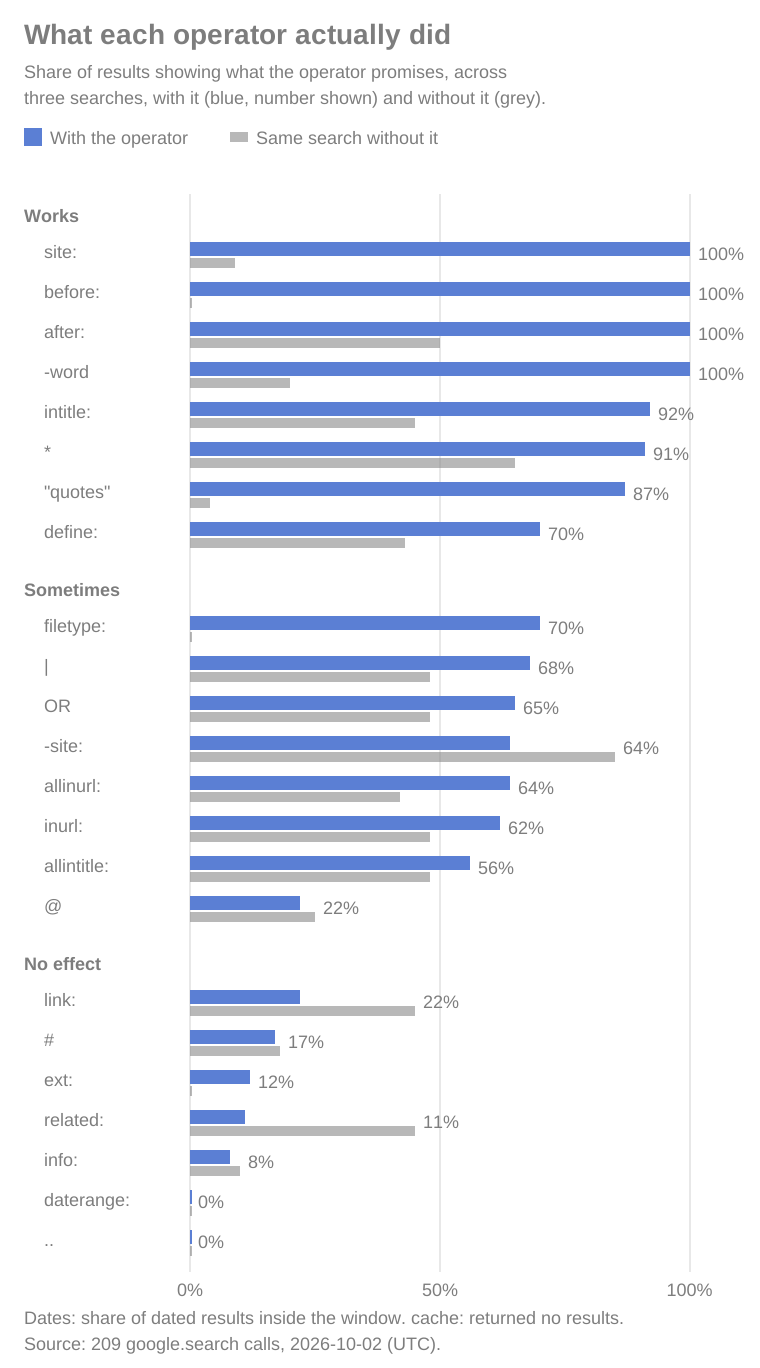
- Eight of 32 operators did what they promise on every search tried. site:, intitle:, before:, after:, quotes, the minus sign, the * wildcard, and define:.
- Five of the six operators Google documents for web search worked every time. The sixth, filetype:, filtered PDFs but came back with no results for a spreadsheet search.
- related:, link:, and info: still return results, but not what they promise. related: and link: returned mostly the named site's own pages, 45 of 54. cache: returned nothing at all.
- Use before: and after:, not daterange:. Every dated result fell inside the window with before: and after:; daterange: had no effect.
Built on AnyAPI
471 scraping and data APIs behind one key.
Every endpoint in this post is one call away. Pay per request in USD from a prepaid wallet, with automatic failover when a provider breaks. No subscription, no card to start.
Get ~160 free requests$0.10 of credit on signup.You've typed site: into Google before, and it did what you expected. Then you tried related: or cache: from an old cheat sheet, got a page of results, and couldn't tell whether the operator did anything.
Most operator lists don't say. So I sent 32 of them through Google on October 2, 2026, three searches each, and compared every search with the same words minus the operator. Each verdict comes from the results that came back, checked against what the operator promises.
At a glance
| Question | What the data says |
|---|---|
| Which Google search operators still work? | site:, intitle:, before:, after:, quotes, minus, *, and define: worked on 3 of 3 searches |
| Does filetype: work? | For PDFs, yes. A docx search returned one result, and an xlsx search returned none |
| Is ext: the same as filetype:? | Not in this test: 3 of 26 results had the extension, against 7 of 10 with filetype: |
| Do related: and link: work? | No. 45 of their 54 results were the named site's own pages |
| Does cache: work? | No. Google retired it in 2024, and it returned no results on 3 of 3 searches |
| How do you search by date? | before: and after:. Every dated result fell inside the window on all six searches |
What a Google search operator is, and the six Google documents
A search operator, sometimes called a Google search command, is a word or symbol that tells Google how to read the rest of your query. Type jaguar speed and Google decides what you meant. Type jaguar speed -car and you've told it: no cars.
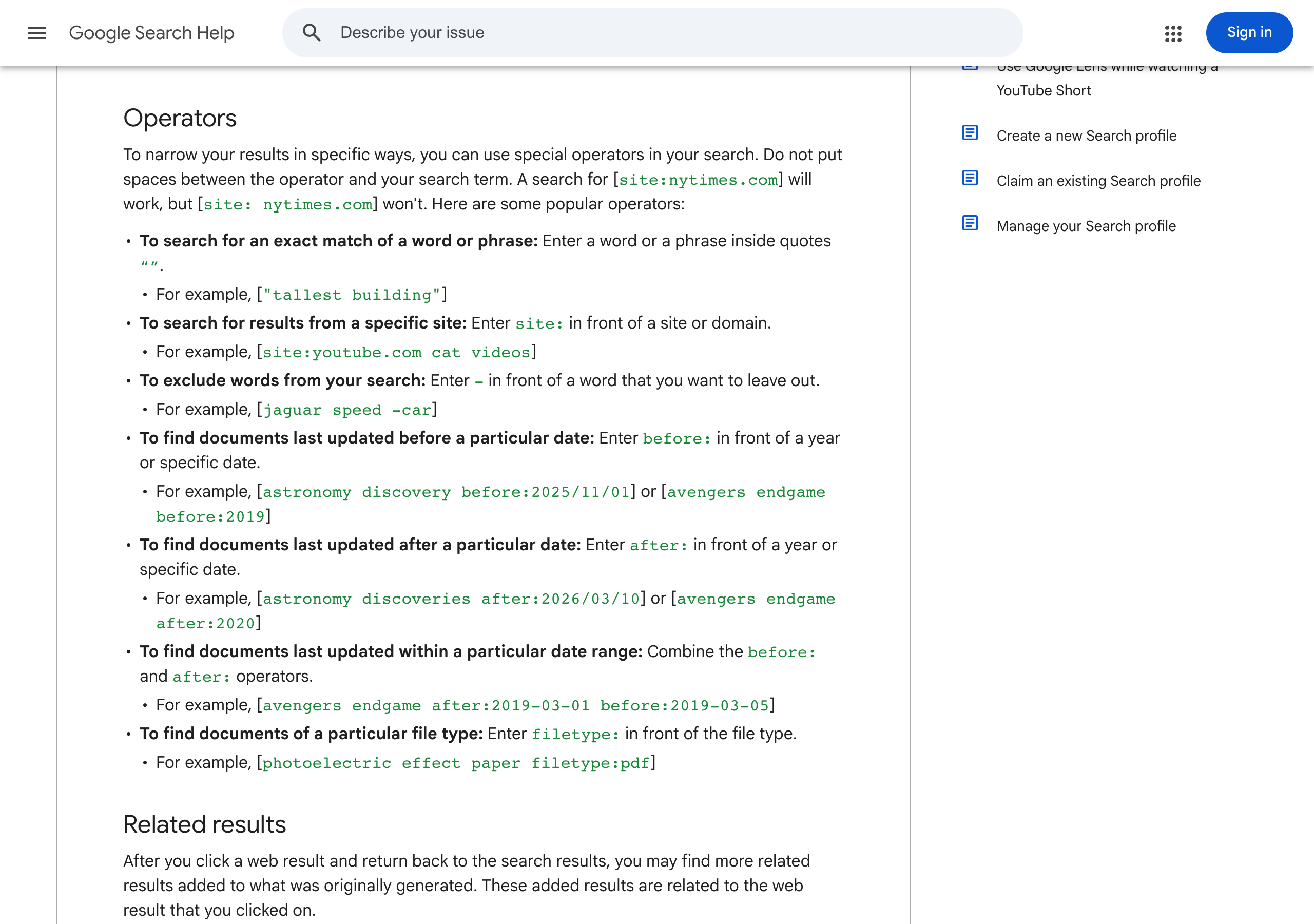
Google's Refine Google searches help page lists six for web search: quotes for an exact match, site:, the minus sign, before:, after:, and filetype:. It also warns that site:nytimes.com works and site: nytimes.com, with a space, doesn't.
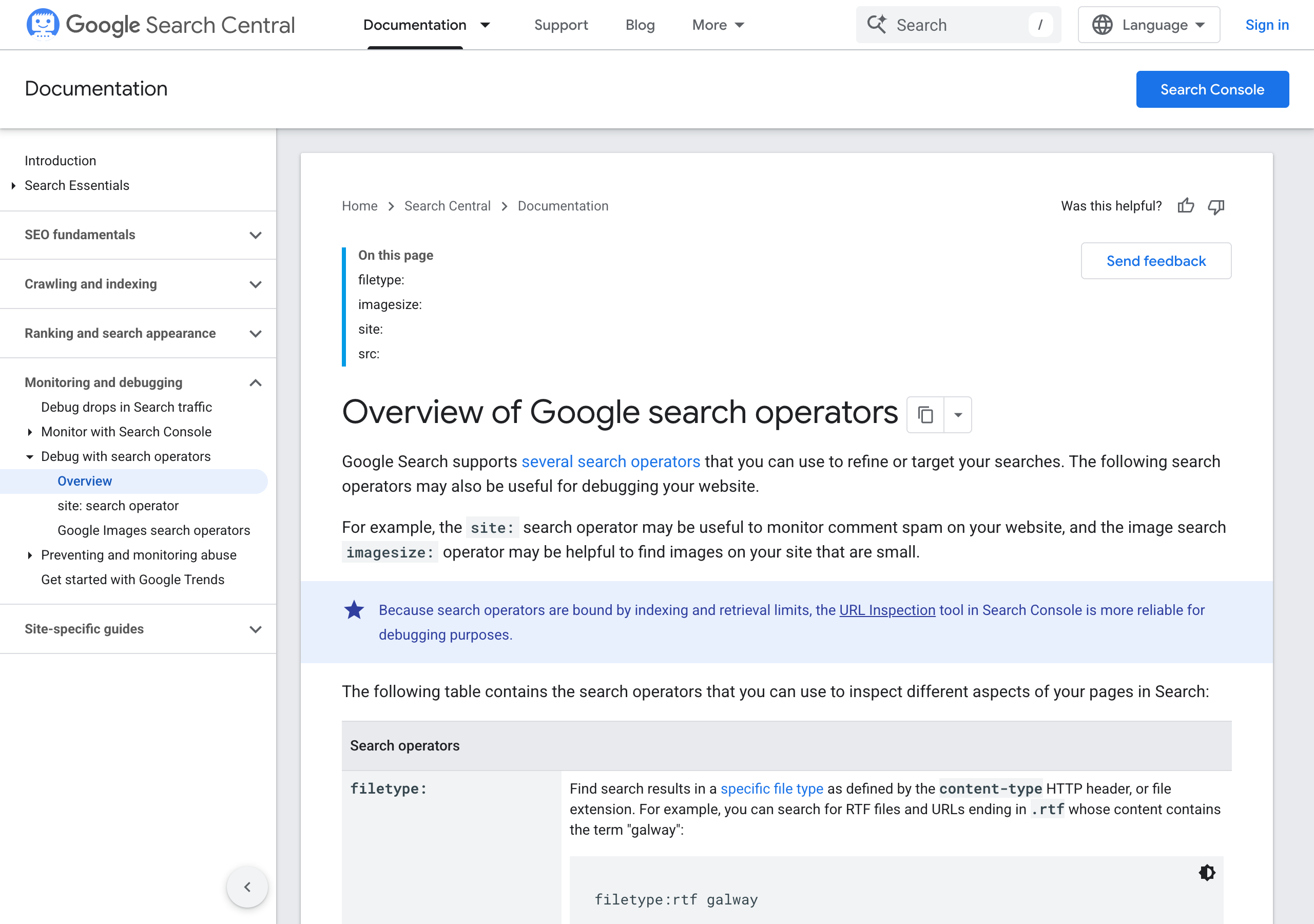
Google's Search Central overview for site owners adds two more, imagesize: and src:, which only work on Google Images. Everything else on this page, from intitle: to AROUND(n), is an operator people pass around that Google doesn't document today.
If you've heard the term "Google dorking", it's this same set of operators, used to find pages a site didn't mean to make easy to find. The results below apply to it too.
All 32 operators, and what each one did
Each operator ran on three searches. An operator "works" when, on all three, most results showed what it promises and more of them did than on the same search without it. It works "sometimes" when that held on one or two of three, and has "no effect" when it held on none. "Can't tell" means what it promises isn't something a list of results can show.
| Operator | Example | Google documents it | Verdict | What came back |
|---|---|---|---|---|
site:, results from one site | site:nasa.gov mars rover | Yes | Works, 3 of 3 | 30 of 30 results on the named site, against 2 of 22 without |
before:, pages from before a date | mars rover before:2020-01-01 | Yes | Works, 3 of 3 | 19 of 19 dated results before the date |
after:, pages from after a date | climate summit after:2026-06-01 | Yes | Works, 3 of 3 | 19 of 19 dated results after the date |
- (minus), leave a word out | jaguar speed -car | Yes | Works, 3 of 3 | 0 of 26 results mentioned the word, against 16 of 20 without |
"..." (quotes), match a phrase exactly | "cheapest way to ship a couch" | Yes | Works, 3 of 3 | 20 of 23 showed the exact phrase, against 1 of 26 |
intitle:, a word in the page title | intitle:review standing desk | No | Works, 3 of 3 | 22 of 24 titles had the word, against 10 of 22 |
* (wildcard), any word in a quoted phrase | "the * of wall street" | No | Works, 3 of 3 | 20 of 22 matched the phrase with a word in the gap |
define:, a definition | define:petrichor | No | Works, 3 of 3 | 16 of 23 results were about the meaning, against 9 of 21 |
filetype:, one file type | photoelectric effect paper filetype:pdf | Yes | Sometimes, 2 of 3 | 6 of 9 PDF results; docx returned 1 result; xlsx returned none |
-site:, leave a site out | best budget headphones -site:reddit.com | No | Sometimes, 2 of 3 | Worked for nasa.gov and reddit.com; on photosynthesis, every result was from Wikipedia, twice |
inurl:, a word in the URL | inurl:recipe banana bread | No | Sometimes, 2 of 3 | 16 of 26 URLs had the word, against 13 of 27 |
allinurl:, every word in the URL | allinurl: banana bread recipe | No | Sometimes, 2 of 3 | 16 of 25 URLs had every word, against 10 of 24 |
allintitle:, every word in the title | allintitle: sourdough starter guide | No | Sometimes, 1 of 3 | 15 of 27 titles had every word, against 11 of 23 |
OR, either word | kayak OR canoe for beginners | No | Sometimes, 1 of 3 | 17 of 26 mentioned only one of the words, against 12 of 25 |
| (vertical bar): either word, like OR | kayak | canoe for beginners | No | Sometimes, 1 of 3 | 17 of 25, against 12 of 25 |
@, social media results | @nasa | No | Sometimes, 1 of 3 | 5 of 23 results on a social platform, against 5 of 20 |
ext:, one file extension | photoelectric effect paper ext:pdf | No | No effect | 3 of 26 results had the extension |
daterange:, a date range, in Julian days | mars rover daterange:2458850-2459215 | No | No effect | 0 of 6 dated results inside the range |
.. (number range), numbers in a range | olympics 1980..1990 | No | No effect | No result showed a number inside the range |
# (hashtag), hashtag results | #booktok | No | No effect | 4 of 24 showed the hashtag, against 4 of 22 |
related:, sites like a site | related:nytimes.com | Retired 2023 | No effect | 24 of 27 results were on the site named |
link:, pages that link to a site | link:github.com | Retired 2017 | No effect | 21 of 27 results were on the site named |
info:, a summary of one page | info:patagonia.com | No | No effect | 2 of 25 results were the homepage, against 2 of 20 without |
cache:, Google's cached copy | cache:nytimes.com | Retired 2024 | No effect | No results on 3 of 3 |
intext:, a word in the body text | intext:warranty standing desk | No | Can't tell | Body text isn't in the results, and snippets already had the word without it |
allintext:, every word in the body text | allintext: banana bread gluten | No | Can't tell | Same as intext: |
inanchor:, a word in links pointing to the page | inanchor:recipe banana bread | No | Can't tell | Link text isn't in the results |
AND, both words | python AND excel automation | No | Can't tell | Google already requires both words by default |
AROUND(n), two words close together | solar AROUND(3) battery | No | Can't tell | Snippets show part of a page, and the plain search already put the words together |
$, a price | camera $400 | No | Can't tell | 25 of 25 results already showed the dollar price without it |
~, synonyms too | ~cheap flights | Retired 2013 | Can't tell | A synonym match isn't visible in a result list |
+, this exact word | magazine +latina | Retired 2011 | Can't tell | The plain search already matched the word |
The documented ones work, and so does intitle:
Five of Google's six documented operators did their job on every search. site: returned 30 of 30 results from the site named. The minus sign took a word out of every result, and quotes turned 1 phrase match in 26 results into 20 in 23.
before: and after: are the date filter to use. Every dated result fell on the right side of the date, on all six searches. Without the operator, most results showed no date at all.
intitle: isn't in Google's docs, and it held up anyway: 22 of 24 titles had the word. So did the * wildcard inside quotes and define:.
filetype: and the URL operators work some of the time
filetype:pdf worked, and the other file types barely did. Six of nine results were PDFs. filetype:docx returned a single result, and filetype:xlsx returned none for "monthly budget template". ext:, which most lists treat as the same operator, returned 3 PDFs in 26 results.
inurl: and allinurl: worked on two of three searches. On the third, the share of URLs with the word was the same with and without the operator. allintitle: worked once. OR and the vertical bar passed the check only on the kayak search, where most results mentioned just one of the two boats.
-site: left out nasa.gov and reddit.com completely. On photosynthesis -site:wikipedia.org, all 10 results were from Wikipedia, on both runs. If you rely on -site:, look at what comes back.
related:, link:, info:, and cache: are gone, even when they return results
Google has retired five of the operators in this test, and said so.
| Operator | Retired | Source |
|---|---|---|
+ | October 2011 | Waxy.org, with a Google spokesperson's comment |
~ | June 2013 | Google's Dan Russell, quoted by Search Engine Roundtable: "Yes, it's been deprecated" |
link: | January 2017 | Google's John Mueller, quoted by Search Engine Roundtable: "AFAIK that's no longer live in search" |
related: | July 2023 | Google's Search Central changelog: "Removed the related: operator ... as it's no longer supported" |
cache: | September 2024 | Google's Search Central changelog and Google SearchLiaison |
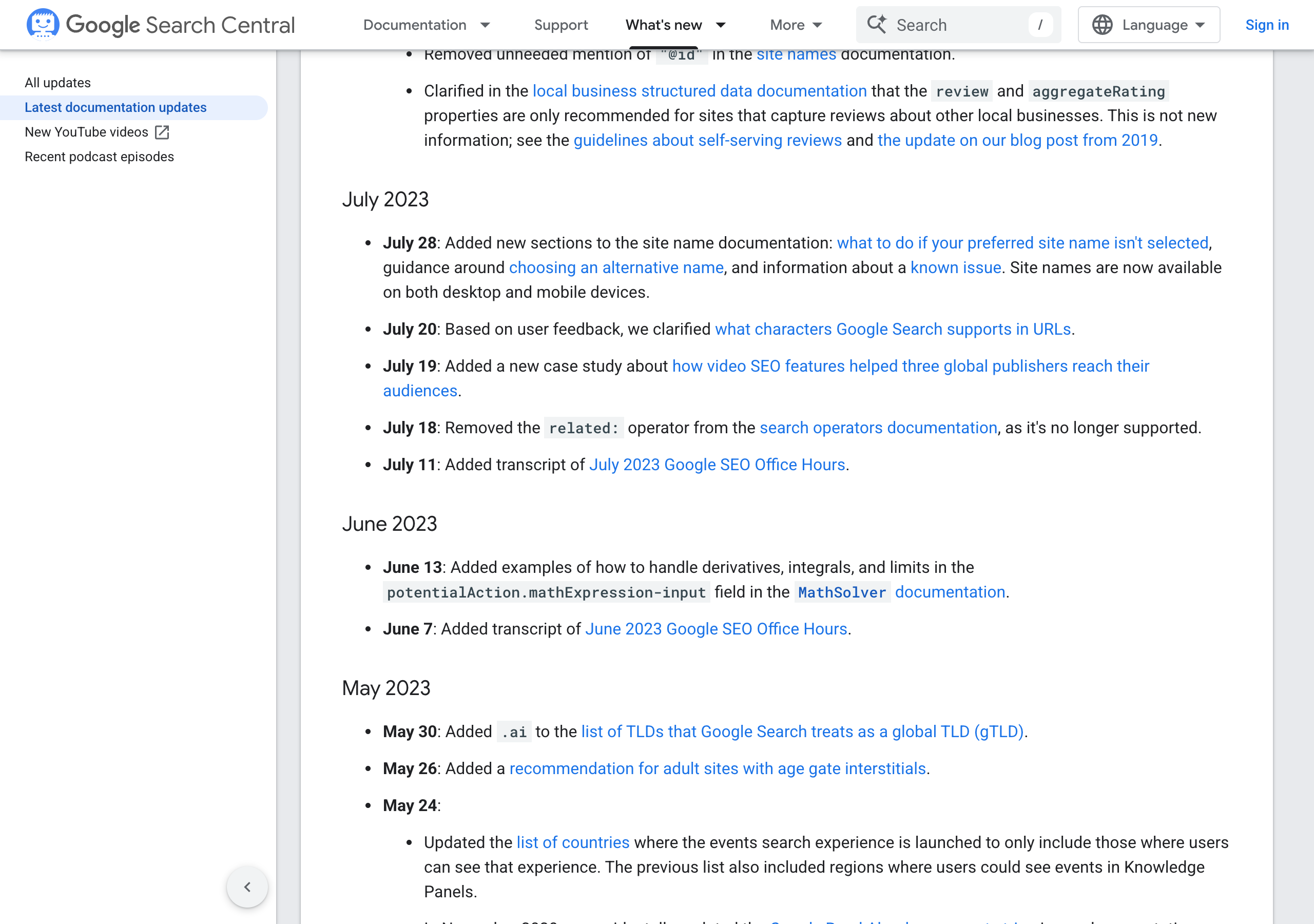
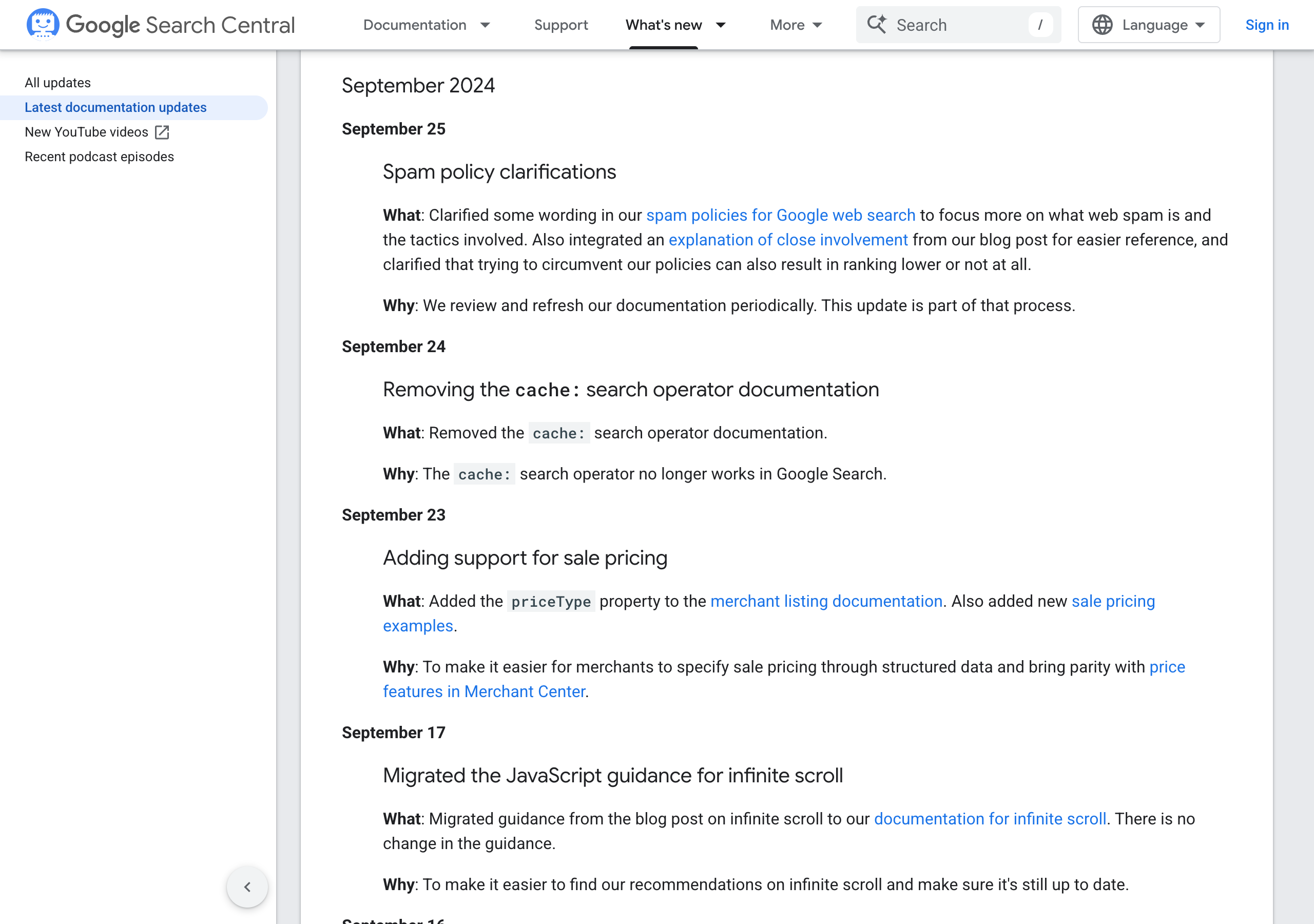
Most of the retired ones don't fail visibly. related:nytimes.com returned nine results, all on New York Times sites, where the operator used to list similar sites. link:github.com returned eight GitHub pages out of nine, where it used to list pages that link to GitHub. info: isn't in Google's docs, and 2 of its 25 results were the homepage it's meant to summarize. Only cache: fails outright, with no results at all.
daterange: never had Google's documentation, and on all three searches no dated result fell inside its range. before: and after: do the same job.
Some operators can't be judged from a results page
Eight operators promise something a list of titles, links, and snippets can't show. intext: and inanchor: are about a page's body text and the links pointing at it. AND is already Google's default. For $ and AROUND(n), the plain search already did what the operator would add: every result for "camera 400" showed "$400" without the dollar sign in the query.
~ and + are retired, so there's no reason to use them. For the other six, the results moved when you added them, but results also move when you run the same search twice, so that alone doesn't show the operator did anything.
How this compares to what is already published
- Oxylabs (August 2026) explains the common operator types and says search engines "periodically deprecate or modify legacy search features". It describes
related:, which Google removed from its docs in 2023. - Apify (October 2025) lists the Google dorking operators it considers supported, partly from its own tests, and notes that "some operators that worked in the past are now deprecated or return inconsistent results", without naming which.
- SerpApi covers Google's URL parameters, such as
hl,gl, andtbs, rather than the operators you type in the query.
All three explain what operators are meant to do. None of them puts each operator next to the same search without it, which is what shows that related: and link: now return a full page of results without doing their job.
How I measured it
- One operator search and one plain search, the same words without the operator, for each of 96 queries. Each search returns Google's first page, about 10 results.
- An operator took effect on a query when more than half of its results showed what it promises, and more than on the plain search. For
-and-site:, fewer than half, and fewer than on the plain search. - For
before:,after:, anddaterange:, it took effect when at least one result showed a date, every dated result was inside the window, and the plain search didn't pass the same test. - Works is 3 of 3 queries, sometimes is 1 or 2, no effect is 0. cache: counts as no effect when it returns no results.
- Searches went through AnyAPI's
google.searchendpoint, not a logged-in browser, so personalization and Google's own experiments can make your results differ.
- I picked 32 operators from Google's help page and the operator lists that rank for this search, and wrote three searches for each.
- I sent each operator search within about a minute of its plain twin, the same words without the operator.
- I checked every result against what the operator promises: the domain for
site:, the URL ending forfiletype:, the title forintitle:, the date at the start of the snippet forbefore:andafter:, and so on. - I replaced two searches whose plain version already passed the check on every result, such as "history coffee", where every title already said "history". A search like that can't show an operator doing anything.
The 209 calls, including repeat runs of some plain searches, ran on October 2, 2026, between 22:17 and 22:52 UTC, and cost $0.11 in total. They all went through google.search, which returns Google's organic results as JSON.
The limits of this data
- Three searches per operator is enough to see whether an operator does anything, and not enough to say how often it fails. One odd result moves a verdict.
- Results came from Google in English, for the US, on one day. A different country, language, or week could move the "sometimes" verdicts.
- The checks read titles, links, snippets, and the date at the start of a snippet. A page that matches in its body text but not in its snippet counts as a miss.
- Google chooses the title it shows for each result from several sources, so a page can match
intitle:without the word in the title you see. That can makeintitle:andallintitle:look weaker than they are.
The big results hold either way: site:, quotes, minus, and the date operators changed every search, and related:, link:, and cache: didn't do their job once.
What to do with it
- Use
site:, quotes, the minus sign,before:, andafter:freely. They worked on every search. - Use
filetype:pdffor documents, and expect little from other file types or fromext:. - Treat
inurl:,allinurl:,allintitle:, andORas hints. Check the results. - Drop
related:,link:,info:,cache:,daterange:,~, and+from your notes. - For backlinks, use a backlink tool instead of
link:.
If you run searches from code, the same operators go in the query string. Here's one call:
curl -sS -X POST 'https://api.getanyapi.com/v1/run/google.search' \
  -H "Authorization: Bearer $ANYAPI_API_KEY" \
  -H 'Content-Type: application/json' \
  -d '{"query":"site:nasa.gov mars rover"}'
And the first two of the 10 results it returned on October 2, 2026:
{
  "output": {
    "found": true,
    "data": {
      "query": "site:nasa.gov mars rover",
      "results": [
        {
          "position": 1,
          "title": "Mars Exploration Rovers: Spirit and Opportunity",
          "link": "https://science.nasa.gov/mission/mars-exploration-rovers-spirit-and-opportunity",
          "snippet": "NASA's Spirit and Opportunity rovers were identical twin robots who helped rewrite our understanding of the early history of Mars."
        },
        {
          "position": 2,
          "title": "Mars Rover Opportunity - Mars Missions",
          "link": "https://www.jpl.nasa.gov/missions/mars-exploration-rover-opportunity-mer",
          "snippet": "Opportunity was the second of the two rovers launched in 2003 to land on Mars and begin traversing the Red Planet in search of signs of ancient water."
        }
      ]
    }
  },
  "costUsd": 0.0005,
  "items": 10
}
google.search costs $0.40 per 1,000 searches, billed per call from a prepaid wallet, so rerunning this whole test would cost about a dime.
Frequently asked questions
- What are Google search operators?
- They're words and symbols you type into the search box to narrow what Google returns, such as site:nytimes.com to keep results to one site, quotes around a phrase to match it exactly, or a minus sign in front of a word to leave it out. Google's own help page lists six for web search: quotes, site:, the minus sign, before:, after:, and filetype:.
- Which Google search operators still work in 2026?
- In a test of 32 operators on October 2, 2026, eight did what they promise on all three searches tried: site:, intitle:, before:, after:, quotes, the minus sign, the * wildcard, and define:. Eight more worked on one or two of three, including filetype:, inurl:, and OR.
- Does the Google cache: operator still work?
- No. Google removed its cache: documentation on September 24, 2024, saying the operator no longer works, and in the October 2, 2026 test, cache: returned no results on all three sites tried.
- What is Google dorking?
- Google dorking, or Google hacking, is using search operators like site:, filetype:, and inurl: to find pages that are indexed but hard to reach by ordinary searching. It's the same set of operators, aimed at what a site exposes, and the same test results apply.
To compare Google search APIs on price, see the cheapest SERP API comparison.
Google results as JSON, operators included, $0.0004 a search. New accounts get free credit, no card required.
Try the Google Search API
Use data responsibly and follow AnyAPI's Acceptable Use Policy.