Best Exa alternatives for AI search and page content (2026)

- If your agent searches by description, stay on Exa. On 10 queries like "startups building AI agents for accounting firms", 83 of Exa's 100 results were the things asked for, against 33 of 87 Google results, which leaned on roundups and forum threads.
- If it looks up facts, Google results answer just as often for far less. Both found the answer to all 10 lookup questions. Exa's search is $4 to $7 per 1,000; AnyAPI's Google search is $0.50 per 1,000.
- Exa now includes the text of the first ten results in that price, so an agent that reads most of the pages it finds pays about the same or less on Exa than it would searching and scraping separately.
- Exa vs Tavily: Exa is the cheaper of the two. Tavily's basic search is $8 per 1,000 on pay as you go, against $7 for Exa's default search and $4 for its fastest.
Built on AnyAPI
448 scraping and data APIs behind one key.
Every endpoint in this post is one call away. Pay per request in USD from a prepaid wallet, with automatic failover when a provider breaks. No subscription, no card to start.
Get ~160 free requests$0.10 of credit on signup.Your agent asks Exa for "companies that make compostable coffee pods" a few hundred times a day, reads the text that comes back, and moves on. That's what Exa was built for. Then the bill shows most of those calls were plain lookups, a port number or a CEO's name, priced the same as the hard ones.
Exa is a search engine run for AI apps instead of people. It crawls the web into its own index and matches queries by meaning, so a description of the page you want works as well as keywords. On October 2, 2026, I sent the same 20 queries through Exa's free keyless MCP server and through AnyAPI's Google search, read 20 of the pages that came back through both, and priced five more search APIs from their own pages.
Here's where Exa is the right call, what its jobs cost elsewhere, the test, Exa vs Tavily, and five other options.
Where is Exa strong?
If your queries describe a kind of thing rather than name it, Exa does something the other options here don't. Most search APIs return what a search engine ranks for your words. Exa returns pages that match what you described.
- Search by meaning. Exa builds its own search models, and its docs tell you to "describe the ideal page, not keywords." A query like "open source vector databases written in Rust" comes back as repos and project pages instead of articles about them.
- Its own index. Exa's FAQ says the index tracks 1.4 trillion URLs and serves 100 billion pages, crawled by its own bot. It also has company, people, and research paper indexes you can filter to.
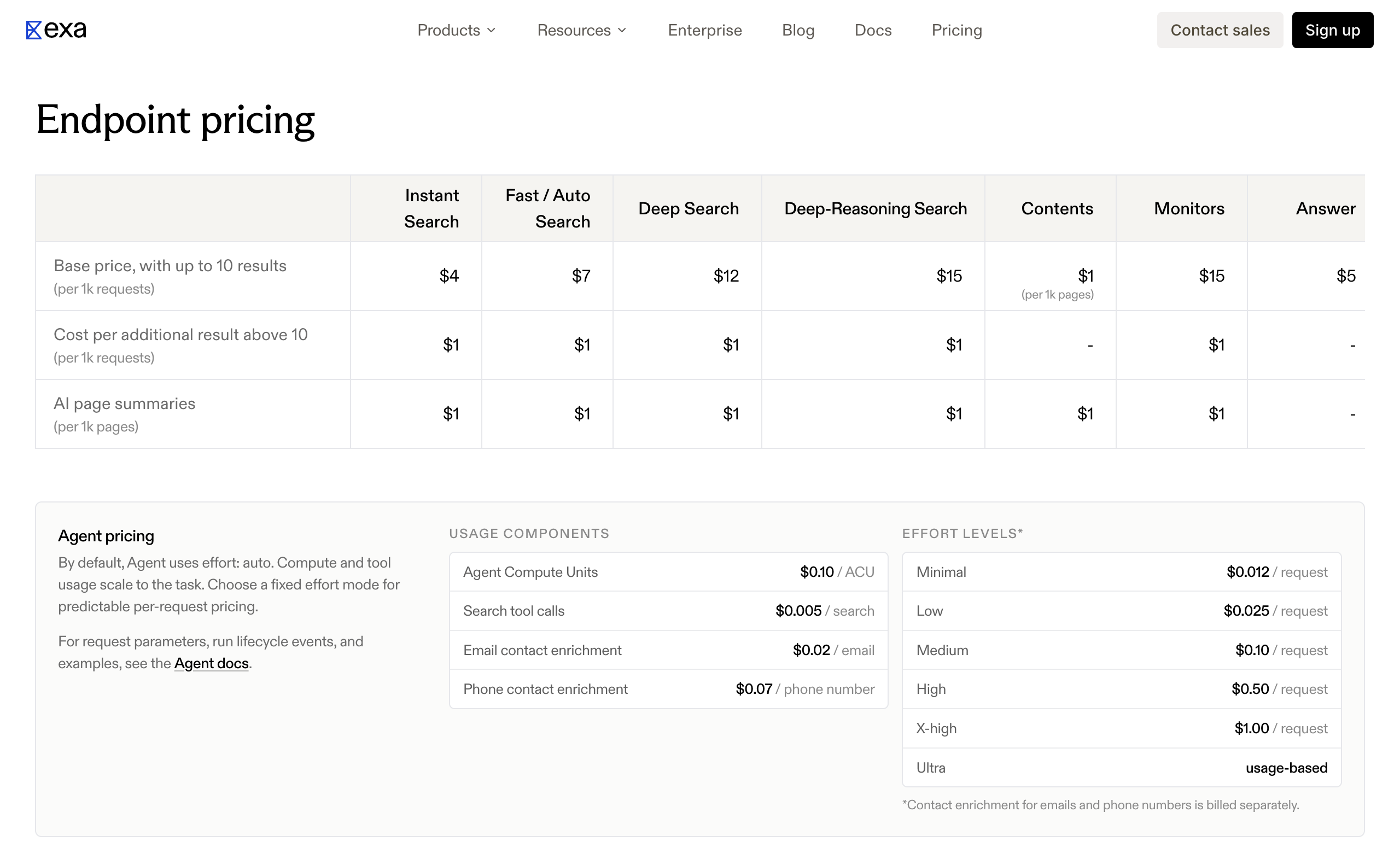
- Page text comes with the search. Since March 3, 2026, every search includes the text and highlights of the first ten results at no extra charge. Exa's fastest search, Instant, is $4 per 1,000 with that text; the default Auto is $7.
- Research in one call. Deep Search ($12 to $15 per 1,000) runs several searches and returns structured answers with citations. The Agent API runs longer research and list building, from $0.012 a run at minimal effort to $1.00 at X-high.
- Speed. Exa's page puts search latency between 180 milliseconds and 1 second. Through its MCP server, my 20 searches took a median of 1.4 seconds.
Exa's free tier is generous too: $10 of credit every month plus a $10 bonus when you finish onboarding, no payment method needed. Its docs say that's up to 2,500 Instant searches.
Exa cons:
- Pricier than Google results for plain lookups
- Find Similar, the "more pages like this URL" endpoint, is deprecated; its docs now point you to a search that describes the page
- Websets needs its own paid plan with separate credits, and its rates sit on a billing page you only see after signing in
Exa pricing: Pay as you go from prepaid credits; search $4 (Instant), $7 (Fast and Auto), $12 (Deep), $15 (Deep-Reasoning) per 1,000 requests with up to 10 results and their text; $1 per 1,000 for each result above 10; Contents $1 per 1,000 pages per content type; Answer $5 per 1,000; Agent $0.012 to $1.00 a run; $10 free credit a month
If your agent mostly finds companies, people, papers, or projects from a description, keep Exa and skip the rest of this page. If a lot of its searches are lookups, keep going.
Where does paying per request win?
Many agent searches are lookups: "what's the rate limit on this API", "who runs this company". The answer is in the first few Google snippets, which cost a fraction of an Exa search.
What does each Exa job cost elsewhere?
Exa's prices are from its pricing page on October 2, 2026.
| Job | Exa | AnyAPI, paying per request |
|---|---|---|
| Search, about 10 results | $4.00 to $7.00 per 1,000, page text included | $0.50 per 1,000, titles and snippets (Google search) |
| Read a known URL | $1.00 per 1,000 pages per content type | $0.70 per 1,000 pages as markdown (web scrape) |
| Cited answer to a question | $5.00 per 1,000 | $2.00 (Google AI Mode) or $5.55 (Perplexity) per 1,000 |
| Sites like this one | Deprecated; describe the page in a search | $0.00167 a call for up to 20 similar domains (similar sites) |
| Long research runs and list building | $0.012 to $1.00 a run | No direct equivalent |
At 100,000 searches a month, that's $400 on Exa Instant or $700 on Auto, against $50.00 for Google results.
What did 20 real queries show?
On October 2, 2026, the same 20 queries went to both. Ten described a kind of thing, the way Exa's docs say to write queries: "startups building humanoid robots for warehouse work", "nonprofits funding malaria vaccine research", "GitHub repositories for web scraping with Playwright in Python". Ten were lookups with one checkable answer, like Redis's default port or who wrote "Attention Is All You Need".
Exa's side ran through its keyless MCP server, ten results a query; Google's through AnyAPI's google.search. For the descriptive queries, I marked each result as a hit when the page belonged to one of the things asked for: a company's own site, a project's repo, the paper, the newsletter. Roundups, Reddit threads, videos, and news stories about one company didn't count.
| Query set | Exa | Google results via AnyAPI |
|---|---|---|
| 10 descriptive queries: results returned | 100 | 87 |
| Results that were the thing asked for | 83 | 33 |
| Queries where that engine had more hits | 10 of 10 | 0 of 10 |
| 10 lookups: answer in the returned text | 10 of 10 | 10 of 10 |
| Text returned per search, median | 17,000 characters of page highlights | 1,900 characters of titles and snippets |
| Charged for all 20 searches | Free tier (list price $0.14 at Auto) | $0.0104 |
The widest gap was on "startups building AI agents for accounting firms": all ten Exa results were company sites. Google's first page had two, Basis and FloQast, next to a Y Combinator directory, a Reddit thread, two listicles, a vendor's blog post, and a news story. For finding things from a description, Exa is clearly better.
For lookups, it didn't matter. Both engines carried the answer to all ten questions in what they returned, and the Google side cost $0.0104 for all 20 searches, including two that a backup source answered at $0.0007.
What does reading the pages cost?
Exa sends page text with every search. With Google results, you scrape the pages you want in a second call. I sent 20 of the result URLs through AnyAPI's web.scrape and through Exa's fetch tool. Both returned text for all 20.
Exa's text was shorter, a median of about 10,000 characters a page against 24,000, and left out the navigation and links. On an arXiv abstract page it sent the full paper. The 20 pages cost $0.01455, nineteen at $0.0007 and one Forbes page that a backup source answered at $0.00125.
That makes the math depend on how many pages your agent opens. Scrape five of the ten results and searching plus scraping comes to about what Exa Instant costs. Scrape all ten and Exa's default search comes out a little cheaper. The saving is in the searches where your agent reads the snippet and stops.
What does one call look like?
Here's the accounting query through AnyAPI's Google search, charged $0.0005 on October 2, 2026, with the first three of its results:
curl -sS -X POST https://api.getanyapi.com/v1/run/google.search \
  -H "Authorization: Bearer $ANYAPI_KEY" \
  -H "Content-Type: application/json" \
-d '{"query":"startups building AI agents for accounting firms"}'{
"costUsd": 0.0005,
"output": {
"data": {
"query": "startups building AI agents for accounting firms",
"results": [
{ "position": 1, "title": "Basis | AI Agents for Accounting", "link": "https://www.getbasis.ai/" },
{ "position": 2, "title": "Finance and Accounting Startups funded by ...", "link": "https://www.ycombinator.com/companies/industry/finance-and-accounting" },
{ "position": 3, "title": "I built an AI agent for Accountants", "link": "https://www.reddit.com/r/Accounting/comments/1i3haj6/i_built_an_ai_agent_for_accountants" }
]
}
}
}Each result also carries a snippet. To read a page, send its URL to web.scrape with "formats": ["markdown"]; the Trigger.dev post on upgrading a 56 TB database came back as markdown for $0.0007.
For a cited answer instead of links, google.ai_mode takes a question and returns Google's AI Mode answer and any sources it cites. It answered all ten lookup questions correctly at $0.0007 each that day ($0.002 a call now); one first attempt timed out and wasn't charged, and the retry answered.
What if the cheapest source fails?
AnyAPI's Google search, web scrape, and Google AI Mode each have more than one source. Your call goes to the cheapest first; if it errors, the next answers in the same request, and a failed call costs nothing.
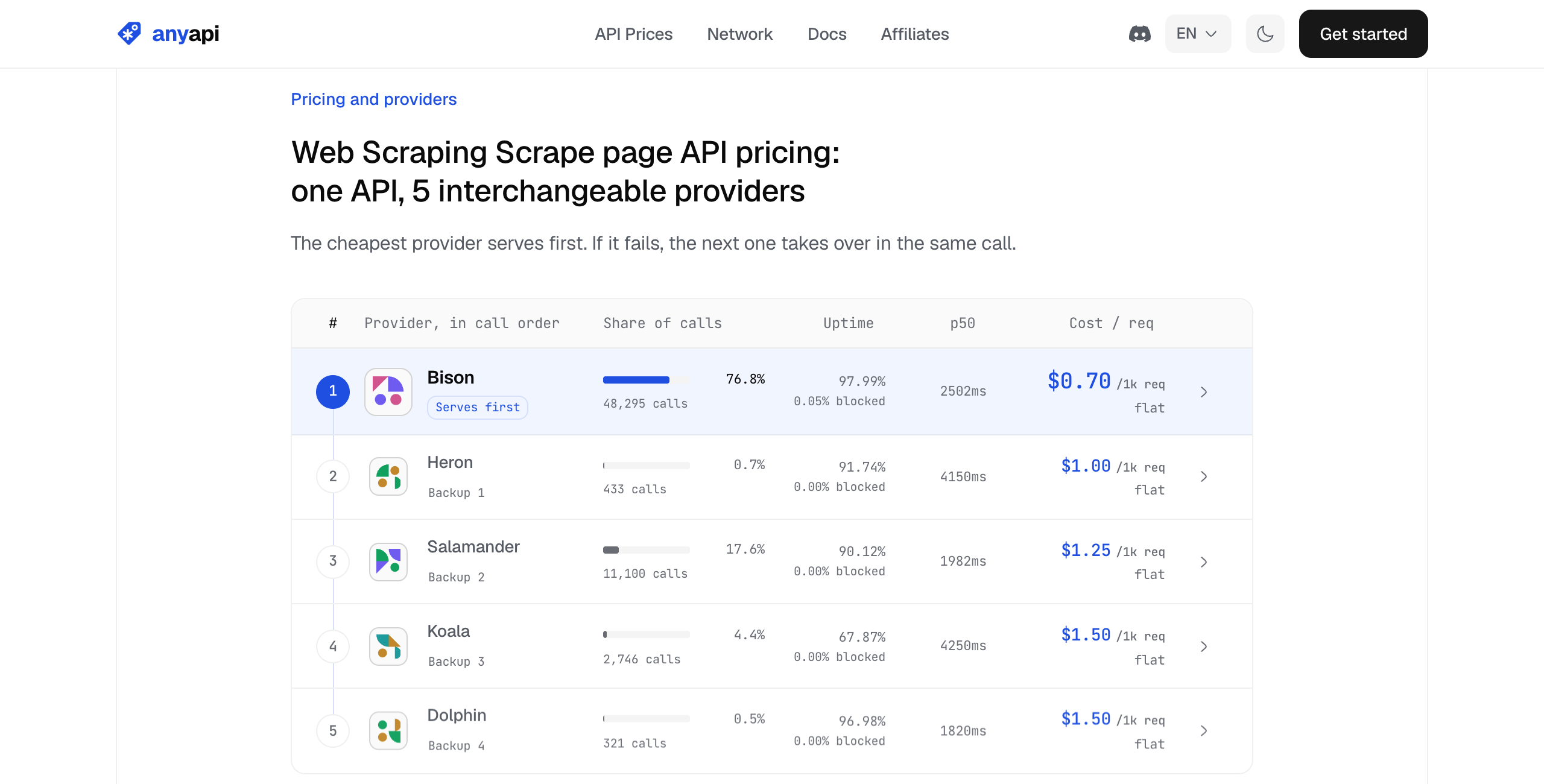
A rescued call costs more, up to $0.0015 for a page and $0.002 for a search. That's still under Exa's Instant price for a search, $0.004.
Exa vs Tavily: which is cheaper for agent search?
Tavily is the other search API built for AI agents, and the one Exa gets compared with most. Both return results with page text in one call, so for most agents the difference is price.
| Exa | Tavily | |
|---|---|---|
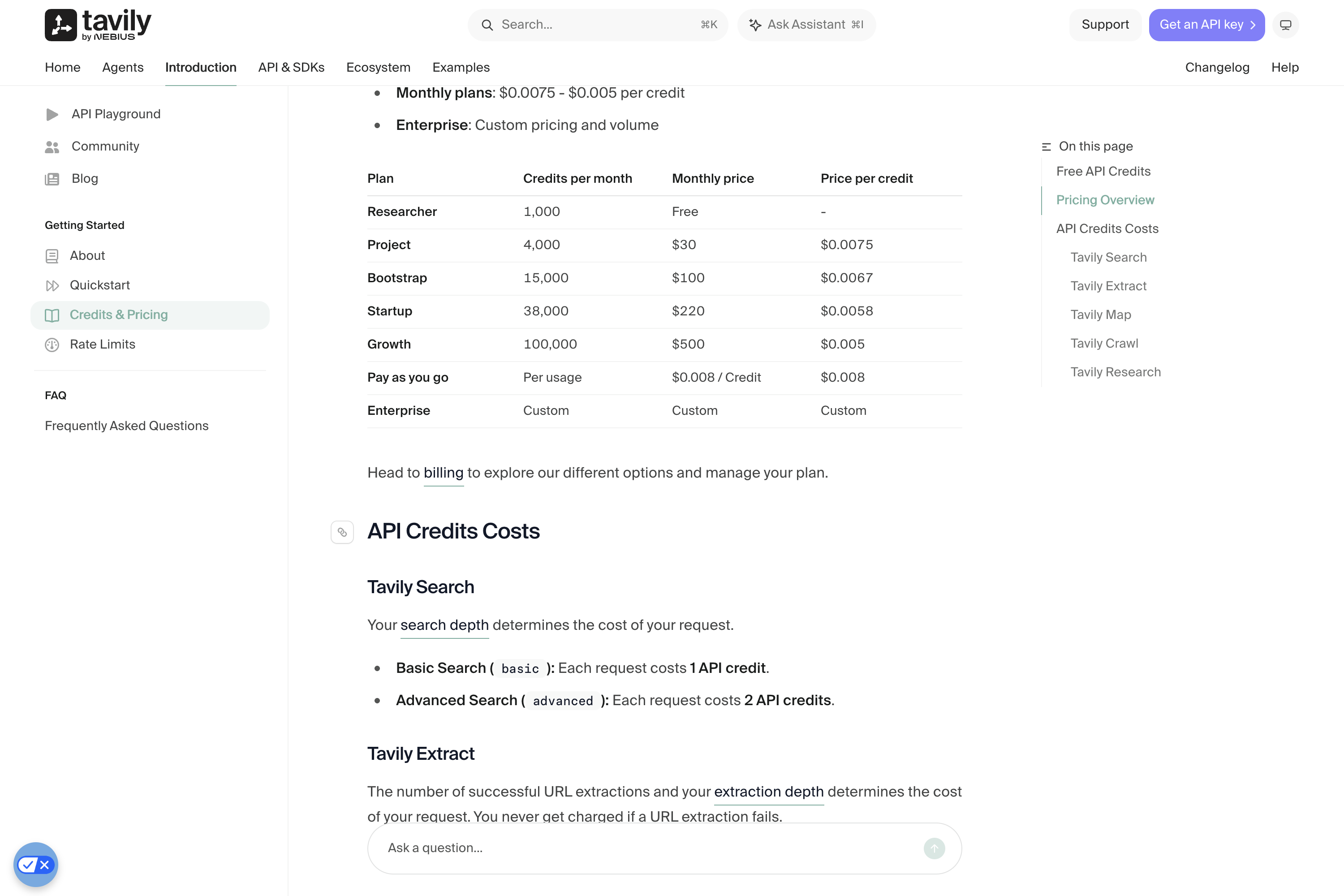
| 1,000 searches, pay as you go | $4.00 (Instant) to $7.00 (Auto) | $8.00 basic, $16.00 advanced |
| Page text | First ten results included | Included with include_raw_content |
| Read a known URL | $1.00 per 1,000 pages | $1.60 per 1,000 pages (basic extract, 5 per credit) |
| Research endpoint | Deep Search $12 to $15 per 1,000; Agent $0.012 to $1.00 a run | Research, 4 to 250 credits a request ($0.032 to $2.00) |
| Monthly plans | None; enterprise contracts for volume | $30 to $500 a month, down to $0.005 a credit |
| Free | $10 a month plus a $10 bonus | 1,000 credits a month |
| Ownership | Exa Labs | Agreed to be acquired by Nebius in February 2026 |
On list prices, Exa is cheaper per search. Tavily's $500 Growth plan brings a basic search to $0.005, still above Exa Instant and below Exa Auto. Pick Tavily if you want a monthly plan with a fixed bill or already use its extract and crawl endpoints. For the full Tavily comparison, including a 20-question test against Google results, see the best Tavily alternatives.
Other Exa alternatives worth a look
A handful of APIs do part of what Exa does. They differ in what they search, whether page text comes with it, and how they bill. Prices are from each vendor's own page on October 2, 2026.
| Service | How you pay | Per 1,000 searches | Page text in the search | Free to try |
|---|---|---|---|---|
| Parallel | Per request | $1.00 (Turbo, Fast) to $5.00 (Basic, Advanced) | Compressed excerpts | 5,000 requests a month |
| Perplexity Search API | Per request | $1.00 (Fast) or $5.00 | Raw search results | Not shown on the pricing page |
| Brave Search API | Per request, prepaid | $5.00 | Snippets plus extra LLM context | $5 of credit a month |
| Firecrawl | Monthly credit plans | $7.60 on the $19 Hobby plan | Scraping each result is 1 more credit | 1,000 credits a month |
| Tavily | Credits, plans or pay as you go | $8.00 basic | Yes, at no extra credit | 1,000 credits a month |
| AnyAPI | Per call, prepaid wallet | $0.50 | No; scrape pages at $0.70 per 1,000 | A small starting balance |
| Exa | Per request, prepaid | $4.00 to $7.00 | Yes, first ten results | $10 a month |
Parallel
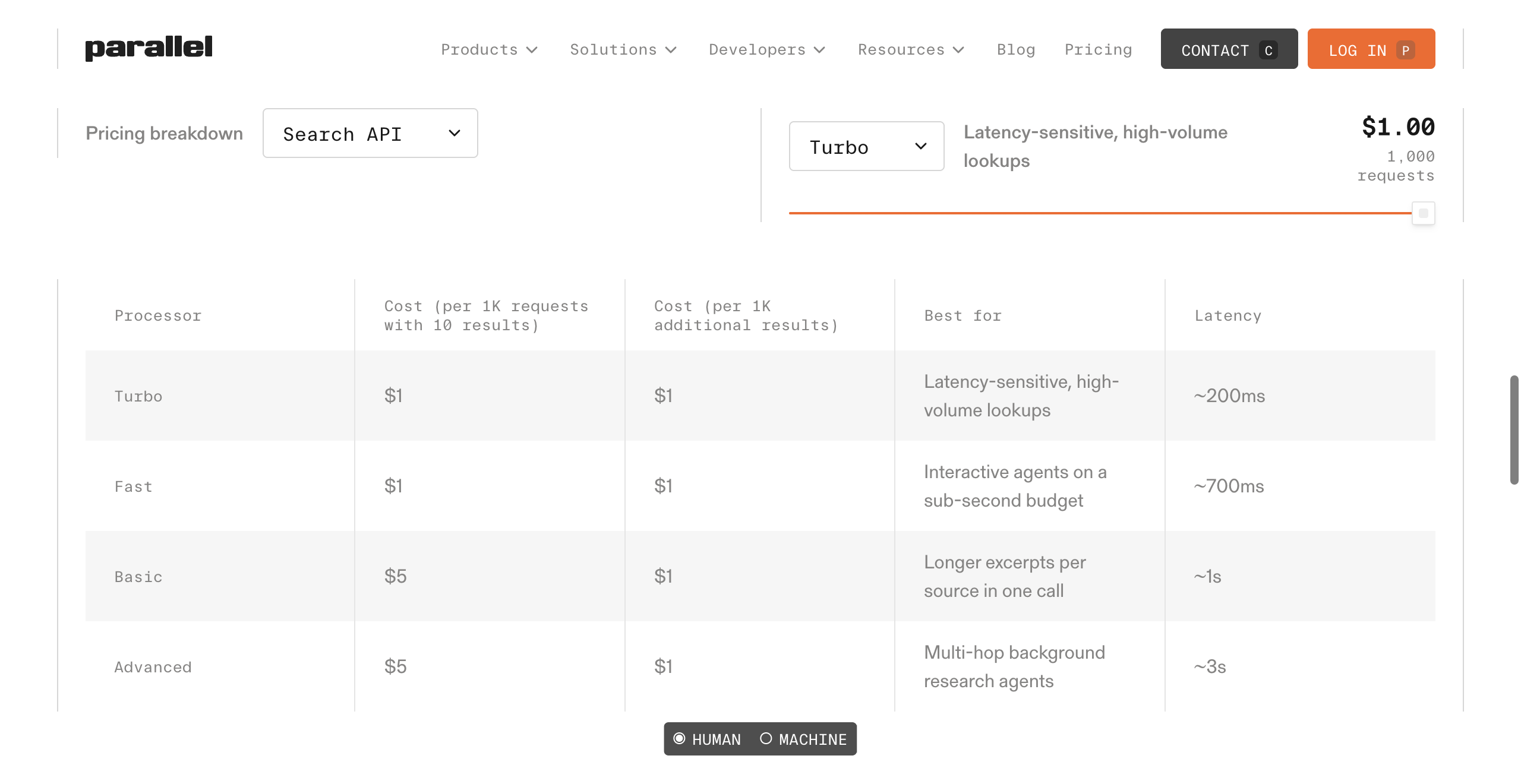
If you want Exa's product line at a lower search price, Parallel is the closest match: a Search API with compressed excerpts, an Extract API for page contents, a Task API for deep research, and a FindAll API that lists every entity matching a query, its take on Websets.
Turbo and Fast searches are $1 per 1,000 with ten results, and Extract is $1 per 1,000, the same as Exa's contents. I didn't run Parallel, so I can't tell you whether it finds things by description as well as Exa did.
Parallel pricing: Search $1 (Turbo, Fast) or $5 (Basic, Advanced) per 1,000 requests with 10 results, $1 per 1,000 extra results; Extract $1 per 1,000; Task $5 to $2,400 per 1,000; FindAll $0.03 to $1 per match; 5,000 free requests a month
Verdict: the one to test if you want search, extraction, and list building like Exa's, for less per search.
Perplexity Search API
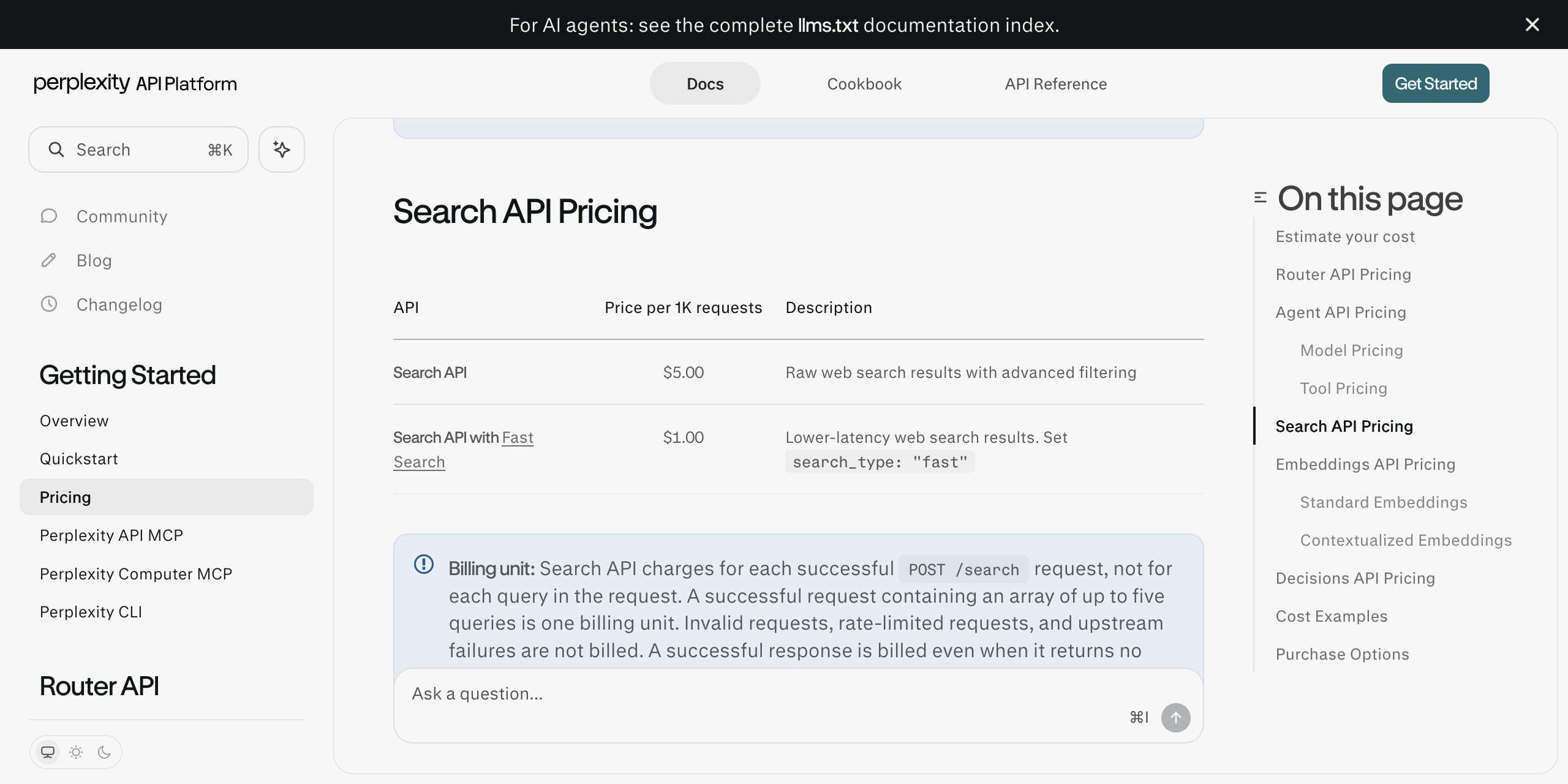
If your agent fires several related queries at once, Perplexity's Search API bills them as one: up to five queries a request, $5 per 1,000 requests or $1 with Fast Search. Failed and rate-limited requests aren't billed; an empty result is. It's raw results, without the written answer Perplexity's chat product gives.
Perplexity Search API pricing: $5.00 per 1,000 requests, $1.00 with Fast Search; up to five queries per request; no per-token charge
Verdict: good value when your agent batches queries, at $0.20 per 1,000 queries on Fast if every request carries five.
Brave Search API
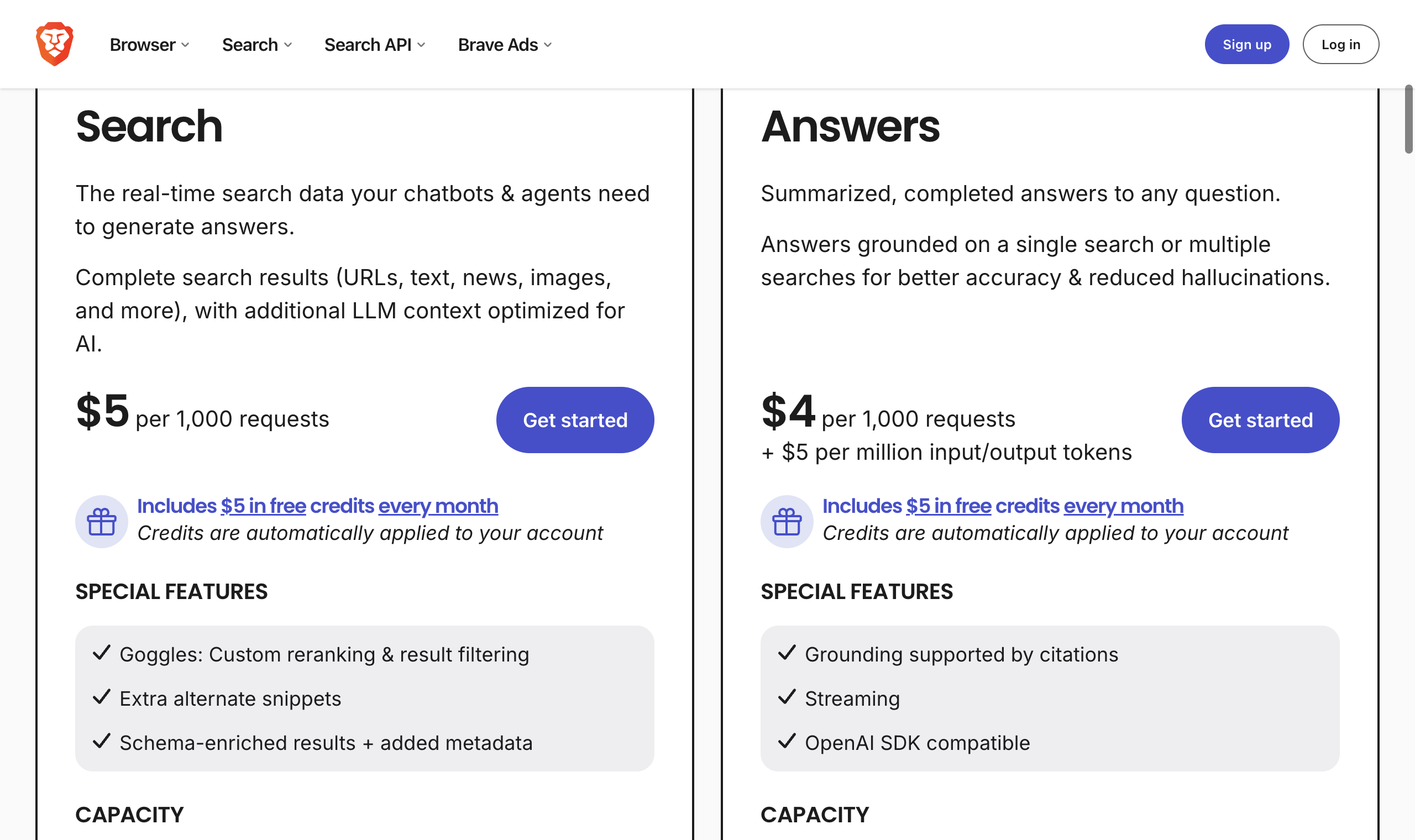
If you want an independent index and don't need search by meaning, Brave is the other option. Brave says its index covers more than 40 billion pages, and the search plan adds "additional LLM context optimized for AI" to standard results. The $5 of free credit a month covers 1,000 searches, at up to 50 queries per second.
Brave Search API pricing: $5 per 1,000 search requests, $5 free credit a month, 50 queries per second; Answers $4 per 1,000 plus $5 per million input and output tokens
Verdict: the pick for results that come from neither Google nor Exa.
Firecrawl
Exa vs Firecrawl comes down to which job comes first. Firecrawl is a scraping API that added search; Exa is a search engine that returns page text. If your agent crawls whole sites or scrapes pages that fight bots, and searches now and then, Firecrawl keeps both on one balance.
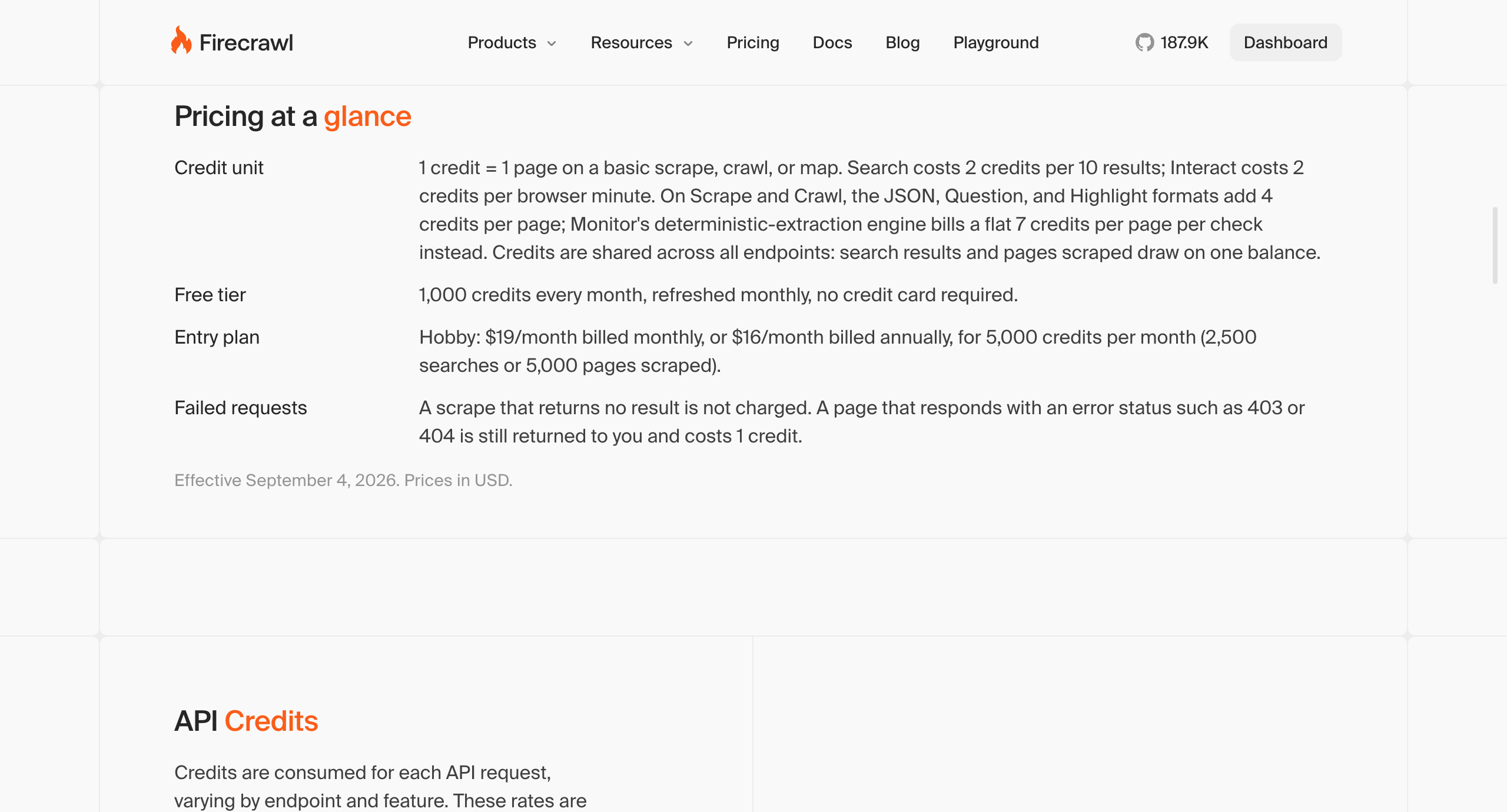
Search costs 2 credits per ten results, plus one per page you scrape. On the $19 Hobby plan that's $7.60 per 1,000 bare searches, close to Exa's Auto; on the $83 Standard plan billed annually, about $1.66. If scraping is the main job, the best Firecrawl alternative compares the scrapers.
Firecrawl pricing: 2 credits per 10 search results, 1 credit per scraped page; 1,000 free credits a month; Hobby $19 a month (5,000 credits), Standard $83 a month billed annually (100,000)
Verdict: worth it when scraping is the main job and search is the side one.
The short version:
- Finding companies, people, papers, or projects from a description: Exa
- Lookups where the snippet holds the answer: AnyAPI's Google search
- An agent that reads most of the pages it finds: Exa, whose search includes the text
- Exa's product line for less per search: Parallel
- Batched queries billed once: Perplexity's Search API
- An independent index without search by meaning: Brave
- Mostly scraping, sometimes searching: Firecrawl
- A monthly plan with a fixed bill: Tavily
Exa vs paying per request, at a glance
| What you deal with | Exa | Paying per request on AnyAPI |
|---|---|---|
| What you're billed for | Each search, ten results with text | Each call: a page of Google results, or one page scraped |
| 1,000 searches | $4.00 to $7.00 | $0.50 |
| 1,000 pages read | Included for the first ten results; $1.00 per 1,000 by URL | $0.70 |
| 1,000 cited answers | $5.00 | $2.00 (Google AI Mode) |
| Search by description | Yes, its core strength | No; Google ranks by your words |
| Deep research and list building | Yes, from $0.012 a run | No |
| Free to start | $10 a month | A small starting balance |
| Other data on the same key | Exa Connect providers, billed on top of Agent runs | Social, maps, e-commerce, and SEO endpoints from one wallet |
Limitations and what you give up
Searching by description? Use Exa. Google's first page for "startups doing X" is mostly lists of startups, and you'd need a second step to pull the companies out.
Looking things up? Pay per request. Both engines answered every lookup in the test, and Google results cost a fraction of an Exa search.
AnyAPI cons:
- No search by meaning and no research agent
- Page text is a second call, so reading all ten results costs a little more than Exa's default search
- A call the cheapest source can't answer is billed at a backup's price, up to $2.00 per 1,000 searches
AnyAPI pricing: Pay per request from a prepaid wallet; Google search $0.50, web scrape $0.70, Google AI Mode $2.00, Perplexity $5.55 per 1,000 calls; a small starting balance at signup
If Google results are the part you need, the cheapest SERP API prices seven vendors at three monthly volumes, and the best SerpApi alternative compares APIs for Google results as JSON.
Frequently asked questions
- Can I try Exa without an API key?
- Yes. Exa's hosted MCP server at mcp.exa.ai/mcp has a keyless mode its docs describe as free, rate-limited usage without sign-in. It offers web search and page fetching. Fetching pages back to back hit a 429 Too Many Requests on October 2, 2026; spacing the calls a few seconds apart worked.
- What are Exa's rate limits?
- Exa's billing docs list 10 queries per second for search and answer on the free and pay-as-you-go plans, rising to 25 for 90 days once a team buys $1,000 of credits in 30 days, 5 for deep search, 100 for contents, and 50 Agent runs in progress at a time. Limits apply to the whole team across its keys.
Use data responsibly and follow AnyAPI's Acceptable Use Policy.